
4 Best USB4 eGPU Docks and Enclosures in 2026
We compared USB4 eGPU docks by controller chip, PCIe bandwidth, and power input flexibility, since the controller chip directly determines real GPU throughput.

New to Amazon Prime?
Get fast, free shipping on every pick in this guide, plus Prime Video and exclusive deals.
Try Prime Free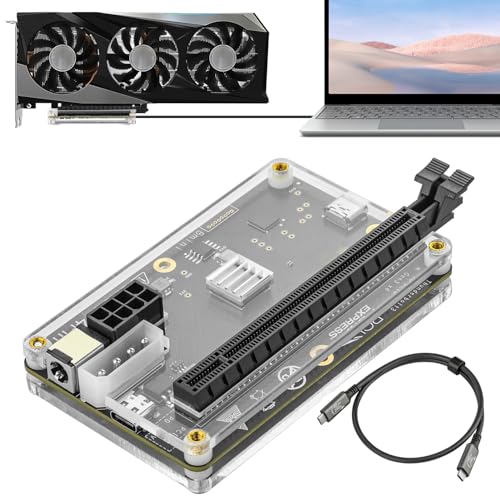


At a Glance
USB4 eGPU docks let you connect a desktop-class graphics card to a laptop or mini PC through a single Thunderbolt or USB4 cable, but the specific controller chip inside the dock, not just its USB4 label, is what actually determines real-world PCIe bandwidth to the graphics card.
We compared this lineup on controller chip generation, PCIe bandwidth, and power input flexibility, since a dock's stated compatible GPU list and required ATX power supply setup matter as much as raw bandwidth for actually getting a graphics card running.
5 Criteria to Look For Before Buying a USB4 eGPU Docks and Enclosure
Key buying criteria so you get the right fit the first time.
The Controller Chip Inside an eGPU Dock, Not Just Its USB4 Label, Determines Real PCIe Bandwidth
The PCIE 3.0 x16 pick uses a JHL6340 controller delivering a stated ~22Gbps, while the GOLDSOUN and GODLIY picks use an officially certified JHL7440 controller delivering 40Gbps, a meaningful real-world difference in graphics card throughput despite all three docks being marketed with similar USB4/Thunderbolt language. This matters directly if you're running demanding workloads like AI training or 8K rendering where bandwidth bottlenecks are noticeable, and matters less for lighter gaming or general creative work where the lower bandwidth still performs adequately. Check the specifically named controller chip model in a listing (JHL6340, JHL7440, or similar) rather than assuming all USB4-labeled eGPU docks deliver identical real-world bandwidth.
An eGPU Dock Purchase Requires Budgeting for a Separate ATX or SFX Power Supply and Graphics Card
All four picks in this comparison specifically state that the graphics card and, in most cases, the ATX power supply are not included in the package, meaning the dock's listed price is only the enclosure and controller itself, not a complete working eGPU setup. This matters significantly when comparing total cost across eGPU dock options, where a cheaper dock might still require the same additional PSU and GPU purchases as a pricier one. Factor in the cost of a compatible power supply and your chosen graphics card before comparing eGPU dock prices as if they represented a complete solution.
Flexible Power Input Options Matter More If You're Reusing Components From an Existing Build
The PCIE 3.0 x16 pick specifically supports four different power input methods (CPU 4+4-pin, Molex, PD 3.0, or DC5521), giving you more flexibility to power the enclosure using whatever power supply or cables you already have on hand, compared to docks with a single fixed power input method. This matters if you're building an eGPU setup around a spare PSU salvaged from an old desktop, and matters less if you're buying a dedicated new power supply specifically for this build regardless of input type. Check a dock's specifically stated power input options if you're planning to reuse an existing power supply rather than buying one new for this specific purpose.
Built-In NVMe Storage in an eGPU Dock Serves a Specific AI and Creative Workflow Need
The MINISFORUM DEG2 pick's integrated M.2 2280 NVMe slot lets you store AI models and project files directly on the dock, maintaining a synchronized workspace when switching the dock between different host devices, a genuinely useful feature for workflows involving large AI model files that would otherwise need to be re-transferred each time you switch hosts. This matters if you regularly move the eGPU dock between multiple computers and want consistent access to large local files, and matters less if the dock stays permanently connected to one host machine with its own adequate storage. Consider whether your specific workflow involves switching hosts frequently before treating built-in NVMe storage as a must-have feature.
A Manufacturer's Specific Wiring Warnings Should Be Read Carefully Before First Power-On
Both the GOLDSOUN and GODLIY picks include a specific and important manufacturer warning against inserting the CPU cable into the dock's PCIE-8PIN port, since doing so triggers an automatic power-off protection and requires unplugging and reconnecting the ATX-24PIN cable to recover, a real risk of user error during initial setup that isn't obvious without reading the specific instructions. This matters for any buyer assembling their first eGPU enclosure, where following the manufacturer's specific power cable sequence avoids an easily preventable setup mistake. Read a dock's specific power cabling instructions and warnings in full before connecting any power source, rather than assuming standard PC power cable conventions apply identically to eGPU enclosures.
4 Best USB4 eGPU Docks and Enclosures in 2026
PCIE 3.0 x16 22Gbps eGPU Dock
About this pick
This dock's JHL6340 controller specifically delivers speeds around 22Gbps, a stated bandwidth figure lower than the JHL7440-based picks in this comparison but still enough for graphics work, video editing, AI art, and AAA gaming according to the listing. Its 4 flexible power input options (CPU 4+4-pin, Molex, PD 3.0, or DC5521) give you more ways to power the enclosure than most competing docks offer.
Compared to the GOLDSOUN and GODLIY picks below, this one is the lowest-priced option in this comparison while still supporting the full range of NVIDIA GPUs from the RTX 5090 down to the older GTX 450, plus AMD cards, and explicitly states compatibility with the Lenovo Legion Go handheld. Its included Thunderbolt 4 cable and 24-pin power jumper cable come bundled in the box.
Best for buyers who want the lowest price while still supporting a wide range of NVIDIA and AMD graphics cards.
Best for: buyers who want the lowest price while still supporting a wide range of graphics cards
Check price on AmazonPros
- +Lowest price in this comparison at under $100
- +4 flexible power input options for different setups
- +Wide GPU compatibility from budget to flagship cards
Cons
- −Lower stated bandwidth (22Gbps) than the JHL7440-based picks
- −ATX power supply and graphics card not included
GOLDSOUN External eGPU Dock
About this pick
This dock's officially certified JHL7440 controller module is a genuinely more rigorously validated chip than the JHL6340 in the cheaper pick above, delivering high-performance results specifically for gaming, AI training and inference, and 3D modeling and rendering. Its listing specifically states support for local deployment of Deepseek-R1, a concrete AI workload benchmark most competing eGPU docks don't reference.
Compared to the PCIE 3.0 x16 pick above, this one's 40Gbps and 85W PD charging TB4 port doubles as a hub with a daisy chain port, letting you attach additional external devices beyond just the graphics card. It supports the latest NVIDIA RTX 50 series and AMD RX 7000 series GPUs specifically.
Best for buyers who want an officially certified controller chip validated for AI and rendering workloads.
Best for: buyers who want a certified controller chip validated for AI and rendering workloads
Check price on AmazonPros
- +Officially certified JHL7440 controller chip
- +Specifically validated for AI workloads like local Deepseek-R1
- +Daisy chain port adds hub functionality
Cons
- −ATX power supply and graphics card not included
- −CPU cable must not be inserted into the PCIE-8PIN port, per an important manufacturer warning
MINISFORUM DEG2 USB4 V2 eGPU Dock
About this pick
This dock's dual-link USB4 V2 and OCuLink interfaces support transfer speeds up to 80Gbps over Thunderbolt 5 or 64Gbps over OCuLink, meaningfully higher bandwidth than the JHL7440-based picks in this comparison, with a dedicated hardware switch to instantly toggle between all-in-one docking mode and pure GPU performance mode. Its integrated M.2 2280 NVMe slot lets you store AI models and project files directly on the dock itself.
Compared to the GOLDSOUN and GODLIY picks above, this one adds a built-in re-drive signal booster specifically designed to stabilize PCIe data transfer and minimize latency during high-bandwidth tasks like LLM inference or 8K rendering. Its single-cable workflow handles data, display, and laptop charging simultaneously with automatic power-on when synced to the host computer.
Best for buyers who want the highest bandwidth with built-in NVMe storage for AI and rendering workflows.
Best for: buyers who want the highest bandwidth with built-in NVMe storage for demanding workflows
Check price on AmazonPros
- +Highest stated bandwidth in this comparison at up to 80Gbps
- +Integrated M.2 NVMe slot for direct AI model and project storage
- +Built-in signal booster stabilizes high-bandwidth PCIe transfer
Cons
- −Highest price in this comparison at under $250
- −Hardware mode switch adds complexity versus simpler always-on docks
GODLIY External eGPU Dock
About this pick
This dock also uses the officially certified JHL7440 controller for workstation-grade performance across gaming, AI training and inference, and 3D modeling, matching the GOLDSOUN pick's controller quality at a slightly different price point. Its two Thunderbolt 4/3 USB4 ports specifically support the latest NVIDIA RTX 50 series and AMD RX 7000 series graphics cards.
Compared to the GOLDSOUN pick above, this one includes the identical 40Gbps and 85W PD charging TB4 port with daisy chain hub functionality, positioning it as a close alternative from a different manufacturer at a modest price difference. Both docks carry the same important manufacturer warning about not inserting the CPU cable into the PCIE-8PIN port.
Best for buyers who want a certified JHL7440 controller as an alternative brand option to the GOLDSOUN pick.
Best for: buyers who want a certified controller chip as an alternative brand option
Check price on AmazonPros
- +Officially certified JHL7440 controller matches the GOLDSOUN pick's quality
- +2 Thunderbolt/USB4 ports for flexible host connections
- +Supports the latest RTX 50 series and RX 7000 series GPUs
Cons
- −ATX power supply and graphics card not included
- −Priced $10 higher than the GOLDSOUN pick with the same controller chip
How We Evaluated These USB4 eGPU Docks and Enclosures
Each pick was assessed across 5 criteria weighted for real-world use.
Controller chip and real bandwidth
The JHL6340 chip on the PCIE 3.0 x16 dock gives about 22Gbps, while GOLDSOUN and GODLIY list an officially certified JHL7440 for 40Gbps. MINISFORUM DEG2 lists up to 80Gbps over Thunderbolt 5 or 64Gbps over OCuLink. We treated bandwidth as the biggest performance limiter. A card on a 22Gbps link cannot reach its desktop performance, however powerful it is.
Power input options
The PCIE 3.0 dock lists 4 power inputs (CPU, Molex, PD 3.0, DC5521) and MINISFORUM supports universal ATX or SFX supplies. We checked which docks need a separate supply, since none of the four sells the graphics card or ATX supply. The graphics card and ATX supply are separate purchases on all four listings.
GPU compatibility
The PCIE 3.0 dock lists NVIDIA GTX 450 through RTX 5090 plus AMD, and a handheld such as Lenovo Legion Go. We compared that with JHL7440 picks, which also work with discrete cards but state fewer card families. Stated card families beat a vague works with most GPUs line.
Laptop charging and hub function
GOLDSOUN and GODLIY list 85W PD charging on a Thunderbolt 4 port with a daisy-chain port that doubles as a hub, and GODLIY adds 2 Thunderbolt 4 or 3 USB4 ports. We checked whether the dock can replace a laptop charger. A dock that charges the laptop cuts one power brick from the desk.
Setup risk
GOLDSOUN and GODLIY warn not to insert the CPU cable into the wrong port, and MINISFORUM has a hardware mode switch that adds complexity. We weighed setup traps against price. A wrong cable in a power port can damage the card, so the instructions matter.
How to Choose the Right USB4 eGPU Docks and Enclosures
By Primary Need
Pick on bandwidth and the job.
| If you want | Recommended pick |
|---|---|
| Widest GPU compatibility at the lowest price | PCIE 3.0 x16 22Gbps eGPU Dock, with 4 power inputs. |
| Certified 40Gbps and 85W laptop charging | GOLDSOUN External eGPU Dock. |
| Two Thunderbolt ports and a hub | GODLIY External eGPU Dock, with 2 Thunderbolt 4 or 3 USB4 ports. |
| Highest bandwidth with NVMe storage | MINISFORUM DEG2 USB4 V2 eGPU Dock, up to 80Gbps. |
By Budget
The spread goes from entry to flagship.
| Price range | Recommended pick |
|---|---|
| Under $100, cheapest | PCIE 3.0 x16 22Gbps eGPU Dock. |
| Under $150, certified 40Gbps | GOLDSOUN External eGPU Dock. |
| Under $160, two ports | GODLIY External eGPU Dock. |
| Under $250, 80Gbps | MINISFORUM DEG2 USB4 V2. |
JHL6340 vs JHL7440 Controller
The chip sets the bandwidth ceiling.
JHL6340
Around 22Gbps, and a PCIE 3.0 x16 dock on this chip is the cheapest. It lists broad GPU compatibility, but a modern card is bandwidth-limited.
JHL7440
The certified chip used by GOLDSOUN and GODLIY gives 40Gbps and 85W charging, a clear step up for gaming.
Choose a JHL7440 dock such as GOLDSOUN unless the lowest cost matters more than frame rate.
By Power Input Flexibility
Power connectors differ more than the box suggests.
| Need | Recommended pick |
|---|---|
| Four input options including Molex and PD 3.0 | PCIE 3.0 x16 22Gbps eGPU Dock. |
| Standard ATX or SFX supply | MINISFORUM DEG2 USB4 V2. |
| ATX supply with a laptop PD pass-through | GOLDSOUN or GODLIY. |
| Avoid wrong-port wiring errors | MINISFORUM DEG2, which has labelled mode switching. |
For AI Training and Local LLM Inference Specifically
Look for
The highest host bandwidth and an NVMe slot, so model weights load quickly and the GPU is not starved.
In this comparison
MINISFORUM DEG2 lists up to 80Gbps over Thunderbolt 5 or 64Gbps over OCuLink with an integrated M.2 NVMe slot.
When to Spend More
Spend more if
You want the highest bandwidth with NVMe storage. MINISFORUM DEG2 sits in the under-$250 tier.
Save if
Broad GPU compatibility is enough. The PCIE 3.0 x16 dock stays under $100.
Frequently Asked Questions
Do I need to buy a graphics card and power supply separately?
Yes. All four docks are empty shells, and the listings state the graphics card and, in most cases, the ATX power supply are not included. Budget for both on top of the dock, and check the supply's connectors against your card.
What is the setup mistake that damages an eGPU dock?
Plugging the CPU power cable into the wrong port, specifically a PCIE 8-pin port, on the GOLDSOUN and GODLIY docks. The listing warns against it, so read the port labels twice before powering on.
Is MINISFORUM DEG2 worth over the JHL7440-based picks for gaming?
For mainstream gaming, no. GOLDSOUN and GODLIY at 40Gbps get strong performance for much less, while DEG2 adds 80Gbps over Thunderbolt 5, OCuLink up to 64Gbps and an NVMe slot, which pays off mainly for AI and rendering.
How do I check that my laptop supports eGPU?
Look for Thunderbolt 3, 4 or confirmed USB4 eGPU support in the laptop's documentation. USB4 does not require PCIe tunneling, so some USB4 ports will not run an eGPU at all even though they accept the cable.
Can I use these docks with a handheld such as the Lenovo Legion Go?
The PCIE 3.0 x16 dock lists Lenovo Legion Go compatibility. Other docks may work too, but only that listing names the handheld, and the 22Gbps link limits performance compared with a 40Gbps dock.
Does an eGPU dock void a laptop warranty?
Connecting a standard USB4 or Thunderbolt device does not normally void it, but a manufacturer can refuse support if a third-party device damages the port. Read your laptop's terms and use only certified power supplies.
Bottom Line
best overall: PCIE 3.0 x16 22Gbps eGPU Dock - best overall value pick in this roundup.
See the full rankings above for all picks with pros, cons, and best-for summaries.
Browse on Amazon
All Prime-eligible options with current pricing.
Shop on Amazon →