
4 Best USB4 Docks for Mac and MacBook in 2026
We compared USB4 docks for Mac by display count per chip generation, built-in storage, and charging wattage, since Apple's own display limits vary by chip.

New to Amazon Prime?
Get fast, free shipping on every pick in this guide, plus Prime Video and exclusive deals.
Try Prime Free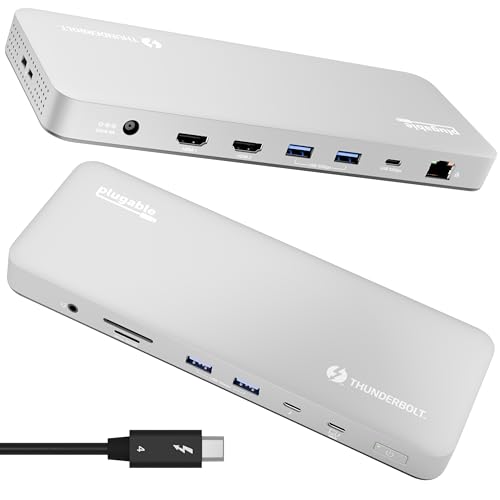


At a Glance
Akkyajaure 40Gbps USB4 Mac mini Dock with SSD Enclosure
↓ See why we picked itApple's own display output limits vary significantly by Mac chip generation, meaning the same USB4 or Thunderbolt 4 dock can deliver dual monitors on an M4 Pro MacBook but only a single display on a base M1 or M2 model, regardless of how capable the dock itself is.
We compared this lineup on display support by specific chip generation, built-in NVMe storage expansion, and charging wattage, since a genuine Mac mini storage dock solves a fundamentally different problem than a MacBook display and charging dock.
5 Criteria to Look For Before Buying a USB4 Docks for Mac and MacBook
Key buying criteria so you get the right fit the first time.
Apple's Display Output Limits Vary by Chip Generation, Not Just by the Dock You Choose
The Plugable Thunderbolt 4 Dock specifically discloses that dual 4K 60Hz display support works on M4/M5 and Pro/Max chip Macs, while base M1 and M2 MacBooks are limited to a single external display regardless of the dock's own capabilities, a hardware limitation set by Apple's own chip architecture rather than any fault in the dock. This matters significantly if you're using an older or base-tier Mac chip and expecting dual monitor support, and matters less if you already own a Pro, Max, or M4/M5-generation Mac. Check your specific Mac model and chip generation's own stated external display limits before assuming any dock, regardless of its own display specs, will unlock dual monitors on an incompatible chip.
A Mac mini Storage Dock and a MacBook Display Dock Solve Fundamentally Different Problems
The Acer and Akkyajaure picks are specifically built as Mac mini stands with integrated SSD enclosures, addressing the Mac mini's lack of user-expandable internal storage, while the Plugable picks are built for MacBooks that already have their own internal storage and instead need external display and charging support. This matters based on which Mac you actually own, where a Mac mini owner needing more storage gets no benefit from a MacBook-focused display dock, and a MacBook owner needing dual monitors gets no benefit from a Mac mini storage stand. Confirm which specific Mac model you're outfitting before choosing between these two genuinely different dock categories.
UL Safety Certification for Power Delivery Is a Verifiable Third-Party Standard Worth Checking For
The Plugable 16-in-1 dock specifically states its 100W Power Delivery was third-party lab tested to UL standards, a recognized independent safety certification that verifies the charging circuitry meets established electrical safety benchmarks, unlike a dock that simply claims '100W charging' without disclosing any independent testing. This matters if charging safety and long-term reliability are a priority, particularly since a dock handles both your laptop's charging and multiple connected peripherals simultaneously, and matters less if you're comfortable relying on general product reviews rather than a specific certification. Look for a specifically stated UL or similar independent safety certification in a listing rather than assuming all docks claiming a wattage figure have been independently verified.
A Mac mini Dock's Aluminum Stand Design Can Serve a Genuine Dual Thermal Purpose
The Acer pick's elevated aluminum stand specifically improves airflow around the Mac mini itself while simultaneously acting as a passive heat sink for the installed SSD, a dual-purpose thermal design that addresses two separate heat sources (the Mac mini and the SSD) with one physical structure. This matters if you're running the Mac mini under sustained heavy workloads where thermal throttling could reduce performance, and matters less for light, intermittent use where heat buildup is rarely a practical concern. Check whether a Mac mini stand or dock specifically discloses its thermal design approach if you plan to use the Mac mini for demanding, sustained workloads.
Editorial Recognition Like 'Dock of the Year' Is a Real Third-Party Signal, But Not a Substitute for Checking Your Own Specific Needs
The Plugable 16-in-1 dock's specifically stated Laptop Mag 2025 Dock of the Year recognition is a genuine third-party editorial endorsement that reflects broad testing and comparison against competitors, giving it more independent validation than a dock with no such recognition. This matters as one useful data point among several when comparing similarly specced docks, but shouldn't override checking the dock's specific port count, display support, and price against your own actual requirements. Treat editorial awards as a supporting signal rather than the sole factor, and still verify the dock's specific stated specs match your own Mac model's needs before purchasing based on an award alone.
4 Best USB4 Docks for Mac and MacBook in 2026
Plugable Thunderbolt 4 Dock for M4/M5 MacBook Air & Pro
About this pick
This dock's dual 4K 60Hz HDMI display support specifically works on all M4/M5 systems, Pro/Max M-series Macs, and M3 Macs in clamshell mode, with the listing explicitly disclosing that base M1 and M2 MacBooks are limited to a single external display, a level of chip-specific transparency many competing docks don't provide. Its 13-port design includes SD/microSD UHS-II card readers alongside a downstream Thunderbolt 4 port rated at 40Gbps.
Compared to the Plugable 16-in-1 pick below, this one is priced roughly $90 lower while still delivering the core dual-display and 100W charging functionality most MacBook users need, trading down on total port count and headline display resolution for meaningfully lower cost. Its space gray aluminum finish is specifically designed to match Mac hardware aesthetically.
Best for buyers who want dual-display support with clear chip-generation compatibility disclosure at a moderate price.
Best for: buyers who want dual-display support with transparent chip-generation compatibility
Check price on AmazonPros
- +Explicitly discloses which Mac chip generations support dual displays
- +13 ports including fast UHS-II card readers
- +Space gray aluminum finish matches Mac hardware
Cons
- −Base M1/M2 MacBooks limited to a single external display
- −Lower total port count than the Plugable 16-in-1 pick below
Plugable 16-in-1 Thunderbolt 4 Dock
About this pick
This dock was specifically named Laptop Mag's 2025 Dock of the Year, a third-party editorial recognition backing its 16-in-1 design that includes 7 USB ports, 2.5Gbps Ethernet, SD/microSD slots, and 100W charging in a single unit. Its 100W Power Delivery is specifically third-party lab tested to UL safety standards, a concrete certification most competing docks in this comparison don't disclose.
Compared to the smaller Plugable pick above, this one adds 2.5Gbps Ethernet (versus standard Gigabit) and a higher total port count, appealing to buyers who want the most complete single-dock solution for a permanent desk setup. Its universal compatibility spans Thunderbolt 5, Thunderbolt 4, USB4, and USB-C laptops running macOS 11+ or Windows 10 or later.
Best for buyers who want the highest port count with UL-tested charging safety certification.
Best for: buyers who want the highest port count with certified charging safety
Check price on AmazonPros
- +Named Laptop Mag's 2025 Dock of the Year
- +UL-tested 100W charging for safety assurance
- +2.5Gbps Ethernet exceeds standard Gigabit networking
Cons
- −Highest price in this comparison at under $300
- −Same dual-display chip limitations apply as the cheaper Plugable pick
Acer Mac mini Dock with 8TB SSD Enclosure
About this pick
This dock solves a genuinely different problem than the MacBook-focused picks above: it's specifically built as a stand and storage expansion for Mac mini M6, M5 Pro, and M4 models, with support for up to 8TB of M.2 NVMe PCIe or NGFF SATA SSD storage installed directly into the elevated aluminum stand. Its 4K@144Hz HDMI 2.1 output specifically supports HDR for enhanced color depth, aimed at creative work and high-refresh-rate monitors.
Compared to the MacBook-focused Plugable picks above, this one's elevated aluminum design specifically improves airflow around the Mac mini itself while doubling as a passive heat sink for the installed SSD, a dual-purpose thermal design unique to Mac mini docks. Its SD/TF card readers rated up to 104MB/s make it genuinely useful for photographers importing high-resolution files directly.
Best for buyers who specifically want Mac mini storage expansion combined with improved cooling at the lowest price in this comparison.
Best for: buyers who specifically want Mac mini storage expansion with improved cooling at the lowest price
Check price on AmazonPros
- +Lowest price in this comparison at under $60
- +8TB SSD expansion built directly into the elevated stand
- +Aluminum design improves both Mac mini airflow and SSD cooling
Cons
- −SSD sold separately, adding to total cost
- −Built specifically for Mac mini, not compatible with MacBook models
Akkyajaure 40Gbps USB4 Mac mini Dock with SSD Enclosure
About this pick
This dock's 40Gbps USB4 Host port is specifically designed to connect directly to a Mac mini's Thunderbolt 4/5 port, giving it a genuinely higher-bandwidth connection standard than the Acer pick's more general port set, which matters directly for large file transfers and high-speed backups. Its M.2 NVMe PCIe SSD enclosure supports the same range of SSD sizes and capacities up to 8TB as the Acer pick, but through a specifically stated 40Gbps interface rather than a slower connection.
Compared to the Acer pick above, this one adds 3 USB 2.0 ports specifically for keyboards, mice, and other low-bandwidth peripherals, keeping its faster ports free for storage and high-speed data devices. Its all-aluminum construction similarly combines aesthetic appeal with heat dissipation for the installed SSD.
Best for buyers who specifically want the highest stated bandwidth figure for a Mac mini storage dock.
Best for: buyers who specifically want the highest stated bandwidth for a Mac mini storage dock
Check price on AmazonPros
- +Specifically stated 40Gbps USB4 Host bandwidth
- +Dedicated USB 2.0 ports keep faster ports free for storage
- +All-aluminum construction aids SSD heat dissipation
Cons
- −SSD sold separately like the Acer pick
- −No stated display output resolution or refresh rate figure
How We Evaluated These USB4 Docks for Mac and MacBook
Each pick was assessed across 5 criteria weighted for real-world use.
Per-chip display disclosure
Mac display limits depend on the chip: base M1, M2 and M3 allow one external display, while Pro and Max chips allow more. We credited listings like Plugable's that disclose chip-specific compatibility, since a vague dual-display claim is a common source of returns. Plugable also lists the M4 and M5 generations by name, which older docks cannot claim.
macOS-specific limits like MST
macOS does not support DisplayPort Multi-Stream Transport, so a basic dock can only mirror a second screen. We checked whether each pick is a Thunderbolt or USB4 design that avoids relying on MST, rather than a driver-dependent dock built for Windows. This matters most for MacBook Air owners who expect two monitors from any USB-C hub.
Mac mini form factor fit
The Acer and Akkyajaure picks sit under a Mac mini and double as SSD enclosures. We checked the stated compatibility, since the Mac mini docks are tied to specific Mac mini generations and the footprint must match. A dock sized for the wrong Mac mini generation will not seat or may block the vents.
Storage and charging
We compared 8TB M.2 enclosure support, UHS-II card readers, and 100W charging for a MacBook Pro. Storage speed claims were weighed against the 40Gbps USB4 or Thunderbolt link that limits them. A drive that bottlenecks at 10Gbps is still faster than most external hard drives.
Price against capability
Prices run from under $65 to under $300. We asked what you give up at each step, such as the Acer trading MacBook-grade charging for an SSD bay, so each tier is tied to a real MacBook or Mac mini scenario. The Acer pairs a 4K 144Hz HDMI 2.1 output with an SSD bay, unusual at its price.
How to Choose the Right USB4 Docks for Mac and MacBook
By Mac Model
Mac chips set the display count, so pick by model first.
| Your Mac | Best pick here |
|---|---|
| M4 or M5 MacBook Air or Pro | Plugable Thunderbolt 4 Dock for M4/M5 MacBook Air and Pro, with chip-specific compatibility disclosed |
| MacBook Pro with Pro or Max chip and many peripherals | Plugable 16-in-1 Thunderbolt 4 Dock, with 16 ports and dual 4K 60Hz |
| Mac mini with storage needs | Acer Mac mini Dock with 8TB SSD Enclosure, with up to 8TB expansion |
| Mac mini on a tight budget | Akkyajaure 40Gbps USB4 Mac mini Dock, with M.2 NVMe enclosure and 40Gbps host link |
By Budget
The four docks run from under $65 to under $300, and the cheap two are Mac mini docks.
| Budget | Best pick here |
|---|---|
| Under $65 | Acer Mac mini Dock with 8TB SSD Enclosure, with 8TB expansion at the lowest cost |
| $85 to $95 | Akkyajaure 40Gbps USB4 Mac mini Dock, with an NVMe PCIe SSD enclosure |
| $200 range | Plugable Thunderbolt 4 Dock for M4/M5, with dual 4K 60Hz HDMI and 100W charging |
| Under $300 | Plugable 16-in-1 Thunderbolt 4 Dock, with 2.5Gbps Ethernet and 16 ports |
Thunderbolt 4 Dock vs Mac mini SSD Dock
These are different products serving different Macs.
Thunderbolt 4 docks
Plugable's two docks suit MacBooks, with dual 4K 60Hz via HDMI or DisplayPort, 100W charging and UHS-II readers. They cost more because they carry display streams.
Mac mini SSD docks
The Acer and Akkyajaure docks suit Mac mini, bundling an M.2 enclosure, a stand and extra USB. They are cheaper, but they lack the display bandwidth and 100W charging of Thunderbolt 4.
MacBook owners should default to the Plugable docks; Mac mini owners wanting storage should choose between the Acer and the Akkyajaure.
By Peripheral Needs
Match ports to what you plug in daily.
| You need | Best pick here |
|---|---|
| SD and microSD UHS-II readers for photos | Plugable Thunderbolt 4 Dock for M4/M5, with 13 ports and card readers |
| 2.5Gbps Ethernet and DisplayPort | Plugable 16-in-1 Thunderbolt 4 Dock, with dual 4K 60Hz via HDMI or DisplayPort |
| 4K 144Hz HDMI 2.1 with HDR | Acer Mac mini Dock, which lists 4K at 144Hz with HDR |
| Plenty of USB 2.0 ports and audio jack | Akkyajaure 40Gbps USB4 Mac mini Dock, with 3x USB 2.0 and a 3.5mm jack |
For a MacBook Pro Editing Desk Specifically
Video and photo workflows need fast cards, stable displays and charging.
Look for
A Thunderbolt 4 dock with 100W charging, UHS-II card readers and clearly disclosed chip support, so your Pro or Max chip runs two displays.
In this comparison
The Plugable Thunderbolt 4 Dock lists 100W charging, SD and microSD UHS-II readers and dual 4K 60Hz, and discloses the chip-specific display limits.
When to Spend More
Spend according to Mac type, not just features.
Spend more if
You use a MacBook Pro for daily multi-monitor work. The Plugable 16-in-1 under $300 adds 2.5Gbps Ethernet and a full port set; see the USB4 dock guide for dual monitors.
Save if
You use a Mac mini and want storage. The Acer under $65 or the Akkyajaure under $90 deliver SSD expansion without the cost of a MacBook dock.
Frequently Asked Questions
Will these docks give my base M3 MacBook Air two external monitors?
No. Base M1, M2 and M3 chips support one external display regardless of the dock. The Plugable Thunderbolt 4 dock discloses chip-specific results, so check its listing, and consider a Pro or Max machine if two monitors are essential.
Why can't I extend a second monitor on a basic USB-C dock?
macOS does not support DisplayPort MST, so cheap docks that split one stream into two can only mirror on a Mac. Thunderbolt docks like the Plugable models carry separate display streams and avoid that limit.
Does the Acer Mac mini dock fit the new M4 Mac mini?
Check the model carefully, since Mac mini docks are sized for specific generations and the footprint must match your unit. Confirm your Mac mini generation on the listing before ordering.
Is the Plugable 16-in-1 worth it over the 13-port Plugable dock?
The 16-in-1 under $300 adds 2.5Gbps Ethernet and UL-tested 100W Power Delivery. The 13-port version under $200 has 100W charging and UHS-II card readers; pick the 16-in-1 only if you need the extra Ethernet and ports.
How do I use the SSD enclosure in a Mac mini dock?
Open the enclosure, slide in an M.2 NVMe SSD up to the listed 8TB limit, secure it, and close the shell. Format it in Disk Utility, then check transfer speeds, which depend on the 40Gbps or 10Gbps link.
Will an SSD-equipped dock overheat my Mac mini?
Heat is the main risk. Docks that raise the Mac mini, like the Qwiizlab-style 3.6cm riser, add airflow, but an enclosed SSD can still throttle under long copies. Keep vents clear and avoid stacking items on top.
Bottom Line
best overall: Plugable Thunderbolt 4 Dock for M4/M5 MacBook Air & Pro - best overall pick in this roundup.
See the full rankings above for all picks with pros, cons, and best-for summaries.
Browse on Amazon
All Prime-eligible options with current pricing.
Shop on Amazon →