
4 Best USB4 Docks for Gaming Handhelds in 2026
We compared gaming handheld docks by charging wattage matched to Turbo Modes, HDMI refresh rate, and cooling, since underpowered charging hurts performance.

New to Amazon Prime?
Get fast, free shipping on every pick in this guide, plus Prime Video and exclusive deals.
Try Prime Free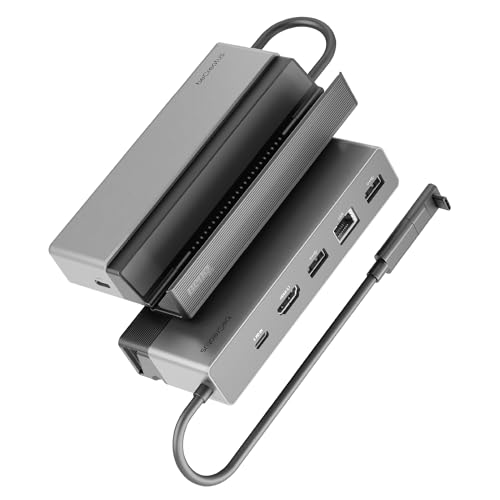


At a Glance
Docking a Steam Deck, ROG Ally, Legion Go, or similar handheld to a TV involves more than just an HDMI port, since the dock's charging wattage needs to match the handheld's specific Turbo or performance modes to avoid battery drain during demanding games.
We compared this lineup on charging wattage matched to named performance modes, HDMI refresh rate, and cooling design, since a dock without adequate charging can leave a handheld's battery draining even while plugged in during graphically intensive sessions.
5 Criteria to Look For Before Buying a USB4 Docks for Gaming Handheld
Key buying criteria so you get the right fit the first time.
A Dock's Charging Wattage Must Match Your Specific Handheld's Named Performance Mode, Not Just a Generic Wattage Figure
The JSAUX pick specifically states it fully supports ROG Ally and Ally X's 30W Turbo Mode and ROG Xbox Ally's 25W and 35W Turbo Modes by name, meaning the dock's charging circuit was validated against those exact performance profiles rather than just claiming a generic '100W charging' figure that might not sustain the handheld's actual peak power draw during demanding games. This matters directly if you regularly use your handheld's highest performance mode for graphically intensive titles, where undersized charging can cause the battery to drain even while connected, and matters less if you typically play in a lower, more power-efficient mode. Check whether a dock's listing specifically names your exact handheld model and performance mode rather than assuming any dock claiming sufficient wattage will sustain your device's peak power draw.
HDMI 2.1 Unlocks Meaningfully Higher Refresh Rates Than HDMI 2.0 for TV Gaming
The BenQ GR10's HDMI 2.1 port specifically supports up to 4K@120Hz or 1080p@360Hz, while the Razer and JSAUX picks' HDMI 2.0 ports cap out at lower refresh rates, a real difference that matters if you're connecting to a high-refresh-rate gaming TV or monitor and want to actually use its full refresh capability. This matters significantly for competitive or fast-paced games where smooth, high-refresh gameplay is noticeable, and matters less if you're connecting to a standard 60Hz television. Check the specific HDMI version (2.0 versus 2.1) stated in a dock's listing rather than assuming any HDMI port supports the same maximum refresh rate.
A Sacrificial Type-C Adapter Protects Your Handheld's Original Port From Repeated Docking Wear
The Dual RGB Fans dock specifically includes a sacrificial Type-C adapter designed to absorb the physical wear from repeated plugging and unplugging, protecting your handheld's built-in USB-C port, which is typically expensive or difficult to repair if it wears out or breaks, from taking that wear directly. This matters if you dock and undock your handheld frequently, where repeated connector stress is a real long-term risk to the device's built-in port, and matters less if you rarely undock the device once connected. Check whether a dock includes this kind of protective sacrificial connector if you plan to dock and undock your handheld frequently.
Active Fan Cooling Prevents Thermal Throttling During Extended High-Intensity Gaming Sessions
The Dual RGB Fans dock's two 5cm diameter cooling fans, specifically larger than the standard 2cm fans on competing docks, deliver more airflow to prevent thermal throttling, a real performance issue where a handheld reduces its own clock speed to manage heat during sustained demanding gameplay. This matters if you play graphically intensive games for extended sessions where heat buildup is a genuine concern, and matters less for shorter or less demanding gaming sessions where thermal throttling rarely becomes an issue. Check whether a dock includes active fan cooling versus relying purely on passive heat dissipation if your typical gaming sessions are long and graphically demanding.
Not Every Dock Supports Every Handheld, Including Explicit Nintendo Switch Exclusions
The JSAUX pick specifically states it is not compatible with the Nintendo Switch 2, while the Dual RGB Fans dock specifically discloses Nintendo Switch 1 and 2 compatibility but notes that data ports are limited by Nintendo's own manufacturer design, meaning even 'compatible' docks may have functional limitations specific to certain handhelds. This matters directly based on which specific handheld you own, where assuming universal compatibility across all gaming handhelds could lead to a purchase that doesn't fully work with your device. Check a dock's specific stated compatibility list for your exact handheld model and generation before assuming broad handheld dock compatibility applies universally.
4 Best USB4 Docks for Gaming Handhelds in 2026
BenQ GR10 USB4 Gaming Docking Station
About this pick
This dock's HDMI 2.1 output specifically supports 1080p@360Hz, 4K@120Hz, or 8K@60Hz with HDR10, genuinely higher refresh rate ceilings than the HDMI 2.0-based picks in this comparison, letting a Steam Deck or ROG Ally output lag-free high-refresh gameplay to a compatible TV or monitor. Its 2.5Gb Ethernet specifically supports stable streaming through Moonlight and GeForce NOW for cloud gaming scenarios.
Compared to the Razer pick below, this one's 2-in-1 stand design flips down to place the handheld flat on a TV stand or flips up to save desk space in a compact vertical position. Its aluminum alloy shell is specifically designed to prevent performance crashes from overheating during extended gaming sessions.
Best for buyers who want the highest HDMI refresh rate ceiling for lag-free high-refresh gameplay.
Best for: buyers who want the highest HDMI refresh rate ceiling for lag-free high-refresh gameplay
Check price on AmazonPros
- +HDMI 2.1 supports up to 4K@120Hz, highest refresh ceiling here
- +2.5Gb Ethernet specifically supports Moonlight and GeForce NOW streaming
- +2-in-1 flip stand adapts to flat or vertical placement
Cons
- −No HDMI CEC support, per the manufacturer's own note
- −100W adapter recommended separately for optimal performance
JSAUX 4-in-1 Docking Station for Gaming Handhelds
About this pick
This dock specifically states it fully supports named Turbo Modes across multiple handheld brands: ROG Ally and Ally X's 30W Turbo Mode, ROG Xbox Ally series' 25W and 35W Turbo Modes, and full-speed charging for Legion Go, Steam Deck, and MSI Claw, a level of named performance-mode compatibility disclosure none of the other picks in this comparison match. Its widened, raised base is specifically designed to accommodate handhelds with protruding grips.
Compared to the pricier BenQ pick above, this one is the lowest price in this comparison by a wide margin while still delivering 4K@60Hz or 2K@120Hz HDMI output and 100W charging. Its listing explicitly notes it is not compatible with the Nintendo Switch 2.
Best for buyers who want charging specifically matched to named Turbo Mode wattages at the lowest price.
Best for: buyers who want charging specifically matched to named Turbo Mode wattages at the lowest price
Check price on AmazonPros
- +Lowest price in this comparison by a wide margin
- +Explicitly matches charging to named Turbo Mode wattages per handheld brand
- +Widened, raised base fits handhelds with protruding grips
Cons
- −Not compatible with the Nintendo Switch 2, per the manufacturer's own note
- −Only 2 USB 2.0 ports versus the higher port counts on pricier picks
Razer Handheld Dock Chroma
About this pick
This dock's collapsible design is specifically built for gamers on the go, with a solid aluminum chassis geared to withstand travel wear and tear while remaining lightweight and portable, a genuinely different design priority than the more permanent desk-oriented docks in this comparison. Its adjustable hinge lets you use the dock as a display stand for a smartphone or tablet as well, adjustable between 45 and 75 degree viewing angles.
Best for: buyers who want a genuinely portable, travel-friendly dock with an adjustable stand
Check price on AmazonPros
- +Collapsible, travel-friendly aluminum design
- +Adjustable hinge doubles as a phone or tablet stand
- +2-year manufacturer warranty backs the build
Cons
- −HDMI 2.0 caps refresh rate lower than the BenQ pick's HDMI 2.1
- −RGB lighting adds a feature some buyers may not need
Handheld Gaming Console Dock with Dual RGB Fans
About this pick
This dock's dual 5cm diameter fans are specifically larger than the standard 2cm fans typical of competing docks, delivering more airflow to prevent thermal throttling and extend battery lifespan during intense gaming sessions, with a rear switch to disable the fans in cooler environments. Its 12-in-1 port design includes 3x USB 3.0, 3x USB 2.0, Gigabit Ethernet, and 100W PD charging with 40Gbps data transfer.
Compared to the other picks in this comparison, this one specifically includes a sacrificial Type-C adapter designed to absorb wear and tear instead of your handheld's original port, a genuinely distinct protective feature. Its listing also specifically discloses Nintendo Switch 1 and 2 compatibility with the caveat that data ports are limited by Nintendo's own manufacturer design.
Best for buyers who want the most active cooling to prevent thermal throttling during intense sessions.
Best for: buyers who want the most active cooling to prevent thermal throttling during intense sessions
Check price on AmazonPros
- +Larger 5cm cooling fans specifically prevent thermal throttling
- +Sacrificial Type-C adapter protects the handheld's original port from wear
- +Broad compatibility including Nintendo Switch 1 and 2
Cons
- −Device thickness must be under 27cm for proper fit
- −Switch 1/2 data ports are limited by Nintendo's own design, per the listing
How We Evaluated These USB4 Docks for Gaming Handhelds
Each pick was assessed across 5 criteria weighted for real-world use.
HDMI version and refresh ceiling
We checked whether each dock offers HDMI 2.1, because handheld-to-TV play at 4K 120Hz or 1080p 360Hz needs it, while HDMI 2.0 docks cap at 4K 60Hz or 2K 120Hz. The BenQ GR10 stood apart as the only pick listing HDMI 2.1 with 4K 120Hz. A TV that only accepts 60Hz makes the extra HDMI 2.1 spend pointless, so we noted that too.
Power delivery for handheld modes
Handhelds like the ROG Ally or Steam Deck can pull more power in their turbo modes, so we compared 100W Power Delivery against the 65W or lower charging common on cheap docks. All four picks list at least 100W charging or matching, which keeps the handheld from draining while docked. A weak charger is a common reason a handheld loses battery mid-game, so we read the wattage lines closely.
Fit and stand design
Grips, protruding sticks and case thickness decide whether a handheld seats properly. We weighed adjustable hinges, like the Razer Chroma's 45 and 75 degree angles, and a widened base such as the JSAUX's for grip-heavy devices. A dock that wobbles puts strain on the USB-C port, which is the part most likely to fail.
Cooling and thermal design
A docked handheld runs hot when it drives a TV. We favored an aluminum cooling shell or active fans, like the dual 5cm fans on the RGB dock, over plain plastic, though fan noise is a tradeoff for quiet rooms. Sustained heat is what makes frame rates stutter during long sessions.
Port set and ethernet
We looked at 2.5Gb Ethernet, USB-A count, and whether the dock exposes ports a controller or keyboard needs. Across a spread from under $25 to over $100, ethernet and HDMI version explained most of the price difference.
How to Choose the Right USB4 Docks for Gaming Handhelds
By Display Target
The screen you plan to play on sets the HDMI requirement.
| Where you play | Best pick here |
|---|---|
| 4K 120Hz TV or 1080p 360Hz esports monitor | BenQ GR10 USB4 Gaming Docking Station, the only HDMI 2.1 pick here |
| 1440p monitor at 120Hz | JSAUX 4-in-1 Docking Station, which lists 2K 120Hz or 4K 60Hz |
| Standard 1080p or 4K 60Hz TV | Razer Handheld Dock Chroma, with HDMI 2.0 and a USB-A trio for controllers |
| Quiet-capable cooled docking for long sessions | Handheld Gaming Console Dock with Dual RGB Fans, with a rear on/off switch for fans |
By Budget
The picks run from under $25 to over $100, and the price gap tracks HDMI version and build.
| Budget | Best pick here |
|---|---|
| Under $25 | JSAUX 4-in-1 Docking Station, the lowest cost option with 100W charging |
| $40 to $50 | Handheld Gaming Console Dock with Dual RGB Fans, with 12 ports and active cooling |
| $75 to $85 | Razer Handheld Dock Chroma, with a 45 and 75 degree hinge and Razer Chroma RGB |
| Under $125 or more | BenQ GR10 USB4 Gaming Docking Station, with HDMI 2.1 and 2.5Gb Ethernet |
Active Cooling vs Passive Cooling
Cooling changes noise, size and how the dock treats a hot handheld.
Active fans
The dual 5cm fan model blows air across the handheld and has a rear switch. It runs louder, but handhelds under heavy load stay cooler.
Passive aluminum
The BenQ GR10 uses an aluminum cooling shell in a flip stand, silent but dependent on room airflow. Razer's Chroma and the JSAUX stay plastic with no active cooling.
Choose active fans for demanding games or warm rooms, and passive aluminum for quiet office use.
By Handheld Fit
Grips and thickness vary a lot between handhelds.
| Your handheld | Best pick here |
|---|---|
| Handhelds with protruding grips | JSAUX 4-in-1, which widens its base for large-grip devices |
| Slim handhelds in a case | Razer Handheld Dock Chroma, with its adjustable 45 and 75 degree angle |
| Devices that need to stay cool during long sessions | Handheld Gaming Console Dock with Dual RGB Fans, with a sacrificial Type-C adapter to protect the port |
| Handheld also used as a desk PC | BenQ GR10, with 100W PD and 2.5Gb Ethernet |
For Playing on a Living-Room TV Specifically
A TV connection is where HDMI version and cable length matter.
Look for
HDMI 2.1 if the TV supports 4K 120Hz, plus 100W power delivery so the handheld stays charged through long sessions.
In this comparison
The BenQ GR10 lists HDMI 2.1 with up to 4K 120Hz and 100W Power Delivery, which fits modern TVs; the JSAUX tops at 4K 60Hz.
When to Spend More
Pay extra only for features you will use on your own display.
Spend more if
You game on a 4K 120Hz TV or want wired ethernet. The BenQ GR10 gives HDMI 2.1 and 2.5Gb Ethernet; no cheaper pick here matches it.
Save if
You play at 1080p or 4K 60Hz. The JSAUX under $25 or the dual-fan dock under $50 covers charging and output; see the USB4 dock guide for laptop docks.
Frequently Asked Questions
Do I need HDMI 2.1 to play at 120Hz on a handheld dock?
For 4K 120Hz, yes, and the BenQ GR10 is the HDMI 2.1 pick here. Docks with HDMI 2.0 like the JSAUX handle 4K 60Hz or 2K 120Hz, which suits a 1440p monitor. Check that your TV or monitor input supports the same version.
Will a dock work with my Steam Deck, ROG Ally and Legion Go?
Most work across handhelds through USB-C, but fit differs. The JSAUX widens its base for handhelds with protruding grips, and the Razer Chroma adjusts angle. Confirm the exact model on the listing, since cases and grips can block seating.
Why is my handheld not charging while docked?
Charging needs a power supply rated for the dock's input, typically 100W Power Delivery here, plus a USB-C cable that supports it. Using a 45W phone charger stalls the handheld in heavy games, so use the wattage the dock lists.
Is the BenQ GR10 worth it over the cheaper JSAUX dock?
If you play on a 4K 120Hz TV or a 1080p high-refresh monitor, yes: HDMI 2.1 and 2.5Gb Ethernet justify the gap. If a 1080p TV at 60Hz is your screen, the budget JSAUX under $25 does the job.
How do I keep a docked handheld from overheating?
Leave the vent area clear, avoid enclosing the dock in a cabinet, and use a dock with a cooling shell or fans such as the dual-fan model. Rear on/off switches let you quiet the fans for light use. Heat shows up as stutter first.
Can a handheld dock double as a laptop hub?
Sometimes. The Razer Handheld Dock Chroma lists HDMI, three USB-A ports and Ethernet, so a phone or laptop works with its USB-C, but fans, stand shapes and PD limits are built for handhelds. For a laptop desk, a general USB4 dock fits better.
Bottom Line
best overall: BenQ GR10 USB4 Gaming Docking Station - best overall pick in this roundup.
See the full rankings above for all picks with pros, cons, and best-for summaries.
Browse on Amazon
All Prime-eligible options with current pricing.
Shop on Amazon →