
4 Best Thunderbolt 5 Docks for 8K Displays in 2026
We compared Thunderbolt 5 docks for 8K displays by real port type, since native HDMI 2.1 output can reach 8K without adapters that some USB-C only docks need.

New to Amazon Prime?
Get fast, free shipping on every pick in this guide, plus Prime Video and exclusive deals.
Try Prime Free


At a Glance
Driving an 8K display through a Thunderbolt 5 dock is genuinely possible now, but the port type matters more than most buyers realize: a dock with native HDMI 2.1 output reaches 8K without adapters, while some USB-C-only designs need additional hardware to get there.
We compared this lineup on real port type, single versus dual 8K support, and documented compatibility restrictions, since one listing specifically excludes Thunderbolt 3, USB-C-only, and Windows ARM hosts entirely from its 8K display support.
5 Criteria to Look For Before Buying a Thunderbolt 5 Docks for 8K Display
Key buying criteria so you get the right fit the first time.
Native HDMI 2.1 Output Reaches 8K Without the Adapter Some USB-C-Only Docks Require
The Plugable pick specifically states its Dual HDMI 2.1 ports deliver up to 8K@60Hz with no adapters needed, distinct from a dock that only outputs 8K through a USB-C or DisplayPort connection requiring a separate adapter to reach an HDMI-only monitor. This matters if your 8K display specifically has an HDMI 2.1 input, since a native port avoids the extra cost, potential bandwidth bottleneck, and possible compatibility issues of relying on an adapter. Check whether a dock's 8K output comes through a native port matching your monitor's actual input type, or whether you'll need to budget for and troubleshoot an additional adapter.
A Dock's 8K Support May Explicitly Exclude Certain Host Types Rather Than Working Universally
The Plugable pick specifically excludes Thunderbolt 3, USB-C-only, and Windows ARM hosts entirely from its documented compatibility, along with gaming laptops that use a DisplayPort MUX, a level of specific exclusion detail that helps prevent a real compatibility mismatch after purchase. This matters significantly if your laptop falls into any of these excluded categories, since no amount of correct cabling or settings will make an explicitly unsupported host work with the dock's 8K feature. Read a dock's full compatibility disclosure for specifically excluded host types, not just its list of supported ones, before assuming your exact laptop will work.
Windows and macOS Frequently Reach Different Real 8K Display Counts on the Identical Dock Hardware
The CalDigit TS5 Plus pick specifically states Windows Thunderbolt 5 hosts can reach dual 8K@60Hz, while Thunderbolt 4 Windows hosts on the same dock drop to dual 6K@60Hz, and Mac support depends on whether your specific Mac model supports those resolutions at all. This matters if you're specifically buying a dock to maximize 8K display support and use either an older Thunderbolt 4 host or a Mac model that doesn't natively support 8K output. Check a dock's platform-specific and generation-specific display specs for your actual host device, not just its single best-case headline 8K claim.
Built-In Storage Expansion Alongside 8K Display Support Can Consolidate a Color-Critical Workflow
The Sonnet Echo 21 pick's built-in M.2 NVMe SSD slot, supporting drives up to 8TB, sits alongside its 8K HDMI output in a single device, letting a video editing or photography workflow run both a high-resolution display and fast local storage without a separate external enclosure taking up another port or desk space. This matters if you're running a color-critical or media-heavy workflow that benefits from both features simultaneously, and matters less if you don't need onboard storage expansion at all. Check whether a dock combines the specific features your actual workflow needs (8K output, fast storage, extensive I/O) rather than assembling multiple single-purpose devices separately.
A Purpose-Built Laptop-Specific Dock Trades General Flexibility for a More Complete Out-of-Box 8K Package
The Brydge ProDock Trio pick is specifically built only for MacBook Pro 16-inch models, shipping with a precision-fit sleeve, a vertical stand, and a Thunderbolt 5 cable included in the box, a more complete package than a standalone universal dock that ships with just the dock itself and requires you to source your own cable and stand. This matters if you own the exact laptop model a dock is purpose-built for and want the extras included, and matters less if you might switch laptop brands or need a dock that works across different devices. Weigh a purpose-built dock's included accessories and tailored 8K compatibility against a universal dock's broader future flexibility before deciding.
4 Best Thunderbolt 5 Docks for 8K Displays in 2026
Plugable Thunderbolt 5 Dock (TBT-UDH2)
About this pick
This dock's listing specifically highlights native Dual HDMI 2.1 ports delivering up to 8K@60Hz or 4K@144Hz with no adapters needed on Thunderbolt 5 hosts, a genuinely cleaner setup than relying on a USB-C to HDMI adapter that could bottleneck bandwidth. Its 16-in-1 design includes 6 USB-C ports, two of which are front-facing 30W charging ports for quick access.
Compared to the CalDigit and Sonnet picks below, this one's listing is unusually specific about exclusions: Thunderbolt 3, USB-C-only, and Windows ARM hosts are explicitly not supported, and gaming laptops with a DisplayPort MUX are also excluded, an honest disclosure that helps avoid a mismatched purchase.
Best for buyers who want native adapter-free 8K HDMI output with clear compatibility disclosures.
Best for: buyers who want native adapter-free 8K HDMI output with clear compatibility disclosures
Check price on AmazonPros
- +Native HDMI 2.1 reaches 8K without any adapter required
- +Unusually specific compatibility disclosures prevent mismatched purchases
- +Front-facing 30W charging ports for quick device access
Cons
- −Explicitly excludes Thunderbolt 3, USB-C-only, and Windows ARM hosts
- −Base M1/M2/M3 Mac chips support only a single external display
CalDigit TS5 Plus Thunderbolt 5 Docking Station
About this pick
This dock's listing specifically states Windows Thunderbolt 5 hosts can reach up to Dual 8K@60Hz, while Thunderbolt 4 Windows hosts are limited to dual 6K@60Hz, a clear generational distinction that helps set correct expectations before buying. On macOS, it supports dual 6K@60Hz or dual 8K@60Hz specifically on Macs that support those resolutions.
Compared to the Plugable pick above, this one's 20 total ports and dual USB controller architecture, giving front and rear ports independent 10Gb/s controllers, deliver more comprehensive connectivity for a workstation that also needs extensive peripheral support alongside its 8K displays.
Best for Windows buyers who want dual 8K display support with the most comprehensive total port count.
Best for: Windows buyers who want dual 8K display support with the most comprehensive port count
Check price on AmazonPros
- +Dual 8K@60Hz support specifically on Windows Thunderbolt 5 hosts
- +Most comprehensive total port count in this comparison
- +Clear generational distinction between Thunderbolt 5 and 4 display limits
Cons
- −Highest price in this comparison at under $500
- −Dual 8K on Mac requires a Mac that specifically supports that resolution
Sonnet Echo 21 Thunderbolt 5 SuperDock
About this pick
This dock's listing specifically states built-in outputs support one up to 8K HDMI or one 4K DisplayPort monitor directly, plus additional displays through Thunderbolt peripheral ports, and depending on your computer, up to two 8K displays total. Its built-in M.2 NVMe SSD slot supports a user-installed drive up to 8TB, adding fast internal storage alongside its 8K display capability.
Compared to the Plugable and CalDigit picks above, this one's single-cable 140W charging supports Mac, Windows, Chromebook, and iPad Pro with Thunderbolt or USB4, a broader stated device compatibility list for buyers with a mixed-device household.
Best for buyers who want built-in NVMe storage expansion alongside genuine 8K display support.
Best for: buyers who want built-in NVMe storage expansion alongside genuine 8K display support
Check price on AmazonPros
- +Built-in NVMe SSD slot eliminates the need for a separate storage enclosure
- +Broad stated compatibility across Mac, Windows, Chromebook, and iPad Pro
- +Direct 8K HDMI output without requiring Thunderbolt-based external adapters
Cons
- −NVMe drive is sold separately and must be user-installed
- −Actual dual 8K support depends on your specific connected computer
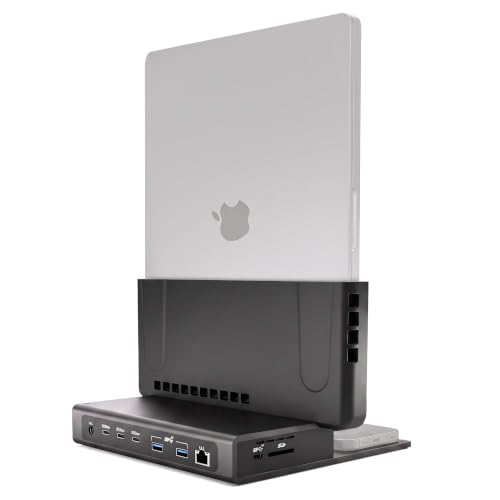
Brydge ProDock Trio TB5 MacBook Docking Station
About this pick
This dock's listing specifically states the dock drives up to two 8K displays at 60Hz or three 4K monitors at 144Hz on a Thunderbolt 5 MacBook, with the honest caveat that display count and refresh rate depend on your exact MacBook chip and Apple's own display limits. Its vertical aluminum stand holds a MacBook Pro upright in a space black finish, reducing desk footprint.
Compared to the Plugable, CalDigit, and Sonnet picks above, this one is purpose-built specifically for MacBook Pro 16-inch models with M1 Max through M5 Max chips, shipping with a precision-fit sleeve, a vertical stand, and a Thunderbolt 5 cable included in the box.
Best for MacBook Pro owners who want dual 8K support in a vertical, desk-saving design with included accessories.
Best for: MacBook Pro owners who want dual 8K support in a vertical, desk-saving design
Check price on AmazonPros
- +Vertical design saves real desk footprint versus a flat dock
- +Honest disclosure that 8K specs depend on exact MacBook chip
- +Ships complete with sleeve, stand, and Thunderbolt 5 cable included
Cons
- −Purpose-built only for MacBook Pro 16-inch, not a general-purpose dock
- −Reduced bandwidth and display support on Thunderbolt 4 Macs
How We Evaluated These Thunderbolt 5 Docks for 8K Displays
Each pick was assessed across 5 criteria weighted for real-world use.
Native 8K output path
We checked whether 8K comes from native HDMI 2.1 or DisplayPort 2.1 or needs a Thunderbolt adapter, because adapters add a failure point and cost. Plugable's native HDMI 2.1 and Sonnet's built-in 8K HDMI gave the cleanest paths in this roundup. A bare listing that only says 8K support without naming the port lost points.
Host-dependent 8K claims
We read the fine print on which hosts reach dual 8K at 60Hz. CalDigit specifies Windows Thunderbolt 5 hosts, while Sonnet says 8K depends on your computer, so a buyer should check their own laptop GPU limit first. Check your laptop's own GPU output limit first, since the dock cannot exceed it.
Thunderbolt 5 versus 4 display tiers
We compared how listings separate TB5 and TB4 limits. CalDigit's TS5 Plus, for instance, drops from dual 8K at 60Hz on TB5 to dual 6K at 60Hz on TB4, which is the difference that matters if your laptop is older. Buying a TB5 dock for a TB4 laptop mostly pays for bandwidth the laptop cannot send.
Compatibility disclosures
We favored listings that name what they exclude, like Plugable's refusal to claim Thunderbolt 3, USB-C only or Windows ARM hosts. Honest exclusions at this level prevent expensive mismatches. Plugable's explicit Windows ARM exclusion is exactly the kind of caveat we looked for.
Power and storage extras
We counted the host charge, 140W on all four, and extras like Sonnet's M.2 NVMe slot for up to 8TB. 8K workflows produce big files, so built-in storage can replace a separate enclosure on the desk. Sonnet's drive is sold separately, so budget for it when comparing real totals.
How to Choose the Right Thunderbolt 5 Docks for 8K Displays
By 8K Setup
Dual 8K is rare, so decide whether you need one panel or two before choosing.
| Your setup | Recommended pick |
|---|---|
| Dual 8K at 60Hz on a Windows Thunderbolt 5 laptop | CalDigit TS5 Plus Thunderbolt 5 Docking Station, which documents that exact case |
| One 8K panel plus a second 4K monitor with no adapters | Plugable Thunderbolt 5 Dock (TBT-UDH2), thanks to native dual HDMI 2.1 |
| An 8K monitor that must work with USB-C, Mac and Chromebook hosts | Sonnet Echo 21 Thunderbolt 5 SuperDock, which lists broad host compatibility |
| A MacBook Pro 16-inch that supports high-resolution displays | Brydge ProDock Trio TB5 MacBook Docking Station, which lists dual 8K at 60Hz depending on chip |
By Budget
8K docks cost more than 4K docks, but within this group the premium maps to ports.
| Budget | Recommended pick |
|---|---|
| You want the most sensible all-round entry in this roundup | Plugable Thunderbolt 5 Dock (TBT-UDH2), with 16 ports and lifetime support |
| You want built-in storage to avoid a separate enclosure | Sonnet Echo 21 Thunderbolt 5 SuperDock, whose NVMe drive is sold separately |
| You will spend for a vertical stand and a MacBook-fit sleeve | Brydge ProDock Trio TB5 MacBook Docking Station, a mid-range option for 16-inch MacBook Pro owners |
| You will pay the top of the range, under $500, for 20 ports | CalDigit TS5 Plus Thunderbolt 5 Docking Station, the highest price here |
Native Ports vs Adapter Paths
How the 8K signal leaves the dock changes cost and reliability.
Native ports (Plugable, Sonnet)
Dual HDMI 2.1 on the Plugable and the built-in 8K HDMI on the Sonnet reach 8K without a Thunderbolt-to-HDMI adapter, which avoids the active-adapter cost and cable swaps.
Via Thunderbolt or DisplayPort (CalDigit, Brydge)
The CalDigit TS5 Plus and Brydge ProDock reach 8K through Thunderbolt or DisplayPort outputs, so you may need your own cable or active adapter for an HDMI-only panel.
Most 8K buyers should default to native HDMI 2.1 unless their monitor already uses DisplayPort.
By Laptop Platform
Operating system decides how many 8K screens the dock may use.
| Your computer | Recommended pick |
|---|---|
| Windows Thunderbolt 5 laptop where dual 8K is the goal | CalDigit TS5 Plus Thunderbolt 5 Docking Station, aimed squarely at Windows 8K |
| Base M1, M2 or M3 Mac with a single external display allowed | Plugable Thunderbolt 5 Dock (TBT-UDH2), though its single-display Mac limit still applies |
| A mixed household of Mac, iPad Pro and Chromebook | Sonnet Echo 21 Thunderbolt 5 SuperDock, with stated compatibility across all of them |
| A 16-inch MacBook Pro used at a fixed desk | Brydge ProDock Trio TB5 MacBook Docking Station, which uses the chip tier to define 8K support |
For Video Editors Specifically
8K footage makes storage the second bottleneck.
Look for
A dock that can host fast storage next to the display output, ideally an M.2 NVMe slot so project drives do not need a separate enclosure and cable.
In this comparison
Sonnet Echo 21 Thunderbolt 5 SuperDock includes an NVMe slot for up to 8TB, though the drive is sold separately and you install it yourself.
When to Spend More
8K needs only change the price if you really run two panels.
Spend more if
You run dual 8K on a Windows Thunderbolt 5 laptop, where CalDigit TS5 Plus at under $500 is the only pick that documents that pairing.
Save if
You use one 8K monitor on any host, where Plugable Thunderbolt 5 Dock (TBT-UDH2) reaches 8K at 60Hz natively and costs less.
Frequently Asked Questions
Do I need a special HDMI cable to get 8K output from these docks?
The Plugable pick specifically states its native HDMI 2.1 ports need no adapters, but you should still verify your HDMI cable is rated for HDMI 2.1 bandwidth, since an older or lower-spec cable can bottleneck 8K signal even with a compatible port.
What's the most common mistake buyers make when shopping for an 8K Thunderbolt 5 dock?
Assuming any Thunderbolt 5 dock will output 8K on any host device, when several docks specifically exclude certain host types (like Thunderbolt 3, USB-C-only, or Windows ARM) or require a specific Mac chip generation to reach that resolution at all.
Is the CalDigit TS5 Plus worth the price over the Plugable dock if I only need single 8K support?
If you only need a single 8K display without extensive additional port connectivity, the Plugable pick's lower price and native adapter-free HDMI 2.1 output likely deliver better value, but if you want dual 8K on Windows with maximum ports, the CalDigit's higher price is justified.
Will my Thunderbolt 4 laptop still get 8K output through these docks?
Support varies significantly by dock; the CalDigit TS5 Plus specifically states Thunderbolt 4 Windows hosts are limited to dual 6K@60Hz rather than the full 8K available on Thunderbolt 5, so checking each dock's Thunderbolt-generation-specific display limits is worth doing.
Can I run 8K and fast external storage from the same dock without extra boxes?
Yes, if the dock has a built-in storage slot. Sonnet's Echo 21 includes an M.2 NVMe slot for up to 8TB alongside built-in 8K HDMI, so a project drive and the monitor share one box. The drive is sold separately and you install it yourself, so budget for that, and check your computer's own 8K limit.
How do I know if my exact MacBook Pro chip supports dual 8K on the Brydge dock?
The Brydge listing specifically states display count and refresh rate depend on your exact MacBook chip and Apple's own display limits, so checking your chip generation against Apple's published display specifications before buying is the reliable way to confirm real support.
Bottom Line
best overall: Plugable Thunderbolt 5 Dock (TBT-UDH2) - best overall pick in this roundup.
See the full rankings above for all picks with pros, cons, and best-for summaries.
Browse on Amazon
All Prime-eligible options with current pricing.
Shop on Amazon →