
7 Best USB-C Hubs Under $50 in 2026
Seven USB-C hubs under $50 compared, from 10-in-1 dual-display hubs to 10Gbps data hubs from Belkin, Satechi and StarTech, with charging and video limits.

New to Amazon Prime?
Get fast, free shipping on every pick in this guide, plus Prime Video and exclusive deals.
Try Prime Free


At a Glance
Between $30 and $50 a USB-C hub splits into two kinds: video hubs that add HDMI and sometimes a second display, and data hubs built for fast 10Gbps ports. Knowing which job you want avoids buying a hub that cannot do it.
We evaluated seven hubs from the listings and sorted them by video support, ports, charging and build. Remember the video hubs need a laptop port that supports DisplayPort.
5 Criteria to Look For Before Buying a USB-C Hubs Under $50
Key buying criteria so you get the right fit the first time.
Video output, HDMI version and refresh rate
A hub's HDMI port only works if your laptop's USB-C port supports DisplayPort Alternate Mode, and the HDMI version decides the picture: 4K@30Hz feels laggy for mouse movement, while 4K@60Hz is smooth. Many budget hubs still use older HDMI 1.4 and cap out at 30Hz. Check the laptop spec for video output, then read the hub listing for the exact refresh rate at 4K, not just the word 4K.
USB-A or USB-C ports and their speeds
Ports differ in speed: older USB 3.0 runs at 5Gbps, newer USB 3.2 Gen 2 reaches 10Gbps, and a USB 2.0 port tops out at 480Mbps. A fast external SSD on a slow port transfers files far slower than it should. Count the ports you use daily, check the speed beside each one in the listing and match fast drives to the 10Gbps ones.
Dual displays and the Mac limit
A hub with dual HDMI ports may clone the same picture on a Mac instead of extending it, because macOS does not support the technology many hubs use for two separate screens. Windows laptops usually extend fine. Read the listing's note on Mac, and if you need two separate screens on a Mac pick a hub designed for it.
Cable length and built-in versus detachable
A hub with a short built-in cable sits tight to the laptop, while a longer or detachable cable lets you place the hub on the desk. A cable that is too short can pull on the port when the laptop moves. Compare the listed cable length and plan where the hub will sit.
Data-only hubs: when video is not the job
A hub with only USB ports and no HDMI is built for fast storage and peripherals rather than screens. These use all 10Gbps ports and avoid the heat and compatibility limits of video, but they do not connect a monitor. Choose one if your displays already connect directly and you simply need more ports.
7 Best USB-C Hubs Under $50 in 2026
Belkin 7-Port USB-C Hub
About this pick
The Belkin 7-port hub offers HDMI 2.0 with 4K, SD and microSD slots, 100W PD and 5Gbps data with a six-point safety system.
It is well-rounded.
Choose it for general use.
Best for: people wanting a trusted brand
Check price on AmazonPros
- +HDMI 2.0 4K
- +SD and microSD
- +100W pass-through
- +Belkin safety protections
Cons
- −5Gbps ports
- −No Ethernet
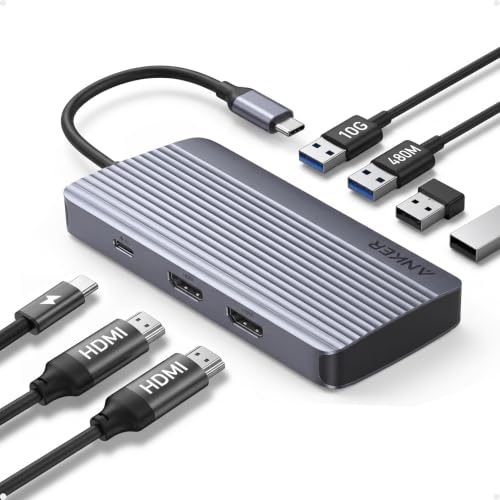
Anker 7-in-1 Dual HDMI
About this pick
The Anker 7-in-1 hub supports two 1080p@60Hz screens, a 10Gbps port and 100W input with 85W output.
It is the dual display pick.
Choose it for two monitors.
Best for: Windows users with two monitors
Check price on AmazonPros
- +Two displays
- +10Gbps port
- +85W charging
- +Anker warranty
Cons
- −Mac shows mirrored
- −1080p per screen
Anker 10-in-1
About this pick
The Anker 10-in-1 hub has 4K HDMI and 1080p VGA, a 5Gbps USB-C port, three USB-A and 85W pass-through.
It has the most ports.
Choose it for legacy.
Best for: offices with older projectors
Check price on AmazonPros
- +Ten ports
- +HDMI and VGA
- +85W charging
- +Anker warranty
Cons
- −VGA is old
- −5Gbps only
Satechi 4-in-1
About this pick
The Satechi 4-in-1 hub has four USB-C 3.2 Gen 2 ports, 100W PD and an aluminum enclosure.
It is data-only.
Choose it for speed.
Best for: data users
Check price on AmazonPros
- +10Gbps
- +100W
- +Aluminum
- +Compact
Cons
- −No video
- −Four USB-C only
Belkin 4-in-1 10Gbps
About this pick
The Belkin 4-in-1 hub has 10Gbps on each port, 100W and audio support.
It is a data hub.
Choose it for peripherals.
Best for: data
Check price on AmazonPros
- +Four 10Gbps
- +100W
- +Audio
- +Slim
Cons
- −No video
- −No card
StarTech 4-Port
About this pick
The StarTech hub has three dedicated 10Gbps ports plus one shared, with 100W PD.
It is business.
Choose it for IT.
Best for: IT pros
Check price on AmazonPros
- +Three dedicated ports
- +100W
- +No drivers
- +IT lab tested
Cons
- −No video
- −One shared port
EJAY Clamp 4-Port
About this pick
The EJAY clamp hub has four 10Gbps ports that clamp to a monitor bezel or desk, with a data cable and a power cable.
It is for the desk.
Choose it for monitor ports.
Best for: desk
Check price on AmazonPros
- +Clamp on a monitor
- +10Gbps
- +Aluminum
- +Dual cables
Cons
- −Low power
- −No video
How We Evaluated These USB-C Hubs Under $50
Each pick was assessed across 5 criteria weighted for real-world use.
Display capability and monitor count
We compared video outputs, noting that the Belkin 7-Port offers HDMI 2.0 4K, the Anker 10-in-1 adds a 1080p VGA, and the Anker 7-in-1 Dual HDMI drives two 1080p@60Hz screens. At this tier, how many monitors a hub can drive decides the pick more than its port count. Mac displays often mirror instead of extend on dual hubs, as the Anker 7-in-1 Dual HDMI warns.
Data speed on every port
We recorded port speeds, such as 10Gbps per port on the Satechi, Belkin 4-in-1 and StarTech, against 5Gbps on the Belkin 7-Port and Anker 10-in-1. External SSD users should look for 10Gbps ports, since a slow port quietly halves transfer speed. The StarTech shares one port among its four, so only three run at the full 10Gbps.
Charging and power budget
We checked wattage, including 100W PD on the Belkin and Satechi and 85W on the Anker pair. A hub that draws power for its own ports leaves less for the laptop, so we read the listed pass-through, not just the headline number. Hubs reserve some wattage for their own ports, so a 100W input leaves less than 100W for the laptop.
Video-free docks versus full hubs
We separated video-free picks, such as the Satechi, Belkin 4-in-1, StarTech and EJAY, from hubs with HDMI. A data-only hub is smaller and faster, but cannot drive a monitor, so we judged each against the job it is built for. Mac owners should read the Anker Dual HDMI caveat, because extended mode is not guaranteed.
Mac and driver caveats
We noted the Anker 7-in-1 Dual HDMI shows two mirrored screens on a Mac, and the StarTech needs no drivers. Mac buyers often hit extended-display limits, so a stated caveat counted against a pick for that audience. The Satechi and Belkin 4-in-1 cost about the same as HDMI hubs yet carry no video.
How to Choose the Right USB-C Hubs Under $50
By Display Setup
Decide how many screens you drive before you decide anything else.
| Your situation | Pick from this guide |
|---|---|
| One 4K monitor plus card slots | Belkin 7-Port USB-C Hub lists HDMI 2.0 4K along with SD and microSD. |
| Two 1080p monitors on Windows | Anker 7-in-1 Dual HDMI drives two 1080p@60Hz screens. |
| One 4K screen plus an older VGA projector | Anker 10-in-1 pairs 4K HDMI with a 1080p VGA port. |
| Monitor already connected to the laptop | Satechi 4-in-1 gives four 10Gbps USB-C ports with no video. |
| Monitor on a dock, drives on the hub | Belkin 4-in-1 10Gbps keeps 10Gbps per port and audio support. |
A hub with no video port cannot add a monitor, whatever the laptop supports.
By Budget
These picks all fall in the $30 to $50 bucket, so decide which feature you pay for.
| What matters most | Pick from this guide |
|---|---|
| Broadest port mix for the money | Anker 10-in-1 combines HDMI, VGA, USB-C and three USB-A ports. |
| Safest charging brand | Belkin 7-Port USB-C Hub lists 100W PD and a 6-point safety system. |
| Two screens | Anker 7-in-1 Dual HDMI is the only dual-display model here. |
| Fastest data on a desk | Satechi 4-in-1 offers four 10Gbps USB-C ports in aluminum. |
| Compact desk-edge clip | EJAY Clamp 4-Port clips on and carries dual cables. |
Ignore the sub-$30 hubs unless you need only ports; this tier adds 10Gbps and dual video.
10Gbps data vs HDMI video
10Gbps data hubs
Move external SSD files at up to twice the speed of 5Gbps ports and keep the laptop cool, but carry no screen. Satechi 4-in-1, Belkin 4-in-1 10Gbps, StarTech 4-Port and EJAY Clamp 4-Port are in this group.
HDMI video hubs
Add a monitor and often card slots, but drop port speed to 5Gbps in most cases. Belkin 7-Port USB-C Hub, Anker 10-in-1 and Anker 7-in-1 Dual HDMI are in this group.
Most buyers with a monitor on the desk should default to an HDMI hub unless they edit large video files.
By Laptop Charger
Match the hub to the wattage your charger actually supplies.
| Your charger | Pick from this guide |
|---|---|
| 65W laptop charger | Anker 10-in-1 passes up to 85W, which leaves room for ports. |
| 100W laptop charger | Belkin 7-Port USB-C Hub and Satechi 4-in-1 list 100W PD. |
| Charger plus fast SSD | StarTech 4-Port lists 100W PD and driverless 10Gbps ports. |
| Light charging, mostly peripherals | EJAY Clamp 4-Port is built for peripherals, not heavy charging. |
For Mac Users Specifically
Look for
A listing that states macOS support, honest display limits and a USB-C input that carries your charger's wattage.
In this comparison
Anker 7-in-1 Dual HDMI mirrors two screens on a Mac, so choose Belkin 7-Port USB-C Hub for a single 4K display or StarTech 4-Port for driverless data.
Extended dual displays on a Mac usually need a dock, not a hub.
When to Spend More
Spend more if
You need ports that can keep up with an SSD or two screens at once, such as Anker 7-in-1 Dual HDMI or Satechi 4-in-1. The under $30 guide covers cheaper picks that top out at 5Gbps.
Save if
You only need HDMI and a few USB-A ports, where Belkin 7-Port USB-C Hub or a sub-$30 pick already covers the basics.
Frequently Asked Questions
Can I use two monitors from one USB-C hub?
The Anker 7-in-1 Dual HDMI drives two screens at 1080p@60Hz, but the listing notes that a Mac shows them mirrored. Windows laptops usually extend them. If you need two extended 4K displays, a docking station is a better tool than a hub.
Is a 10Gbps hub worth it over a 5Gbps one?
Only if you use fast external SSDs. The Satechi, Belkin 4-in-1 and StarTech offer 10Gbps ports, which move large video files faster, while the Belkin 7-Port and Anker 10-in-1 are 5Gbps but add HDMI and card slots. Office users rarely notice the difference.
Why choose a video-free hub like the Satechi?
It is smaller, runs cooler and gives four fast USB-C ports. If your monitor connects to the laptop directly or through a dock, you do not need HDMI in the hub. It is for data and charging, not display.
Does the StarTech share one port?
Yes. The listing says three ports are dedicated 10Gbps and one port is shared, so plugging two fast drives into the shared pair can slow both. Spread your devices accordingly, and keep the dedicated ports for SSDs.
Will a hub charge a laptop and run a monitor at once?
Yes, if the hub passes enough power. The Belkin 7-Port lists 100W PD and the Anker 7-in-1 Dual HDMI lists 100W in and 85W out. Using HDMI and several USB devices leaves less than the full number for the laptop.
What does the EJAY clamp-on design add?
It clips to a desk edge or a monitor, which keeps ports in reach. Its dual cables carry 10Gbps, but the listing flags low power, so it is better for peripherals than for charging a laptop. Check that your desk edge fits the clamp.
Bottom Line
best overall: Belkin 7-Port USB-C Hub - best overall pick in this roundup.
See the full rankings above for all picks with pros, cons, and best-for summaries.
Browse on Amazon
All Prime-eligible options with current pricing.
Shop on Amazon →