
7 Best Trackball Mice for Mac in 2026
Seven trackball mice that list Mac support, compared by Bluetooth pairing, macOS versions named, back-button caveats and USB-A dongle needs for MacBook desks.

New to Amazon Prime?
Get fast, free shipping on every pick in this guide, plus Prime Video and exclusive deals.
Try Prime Free
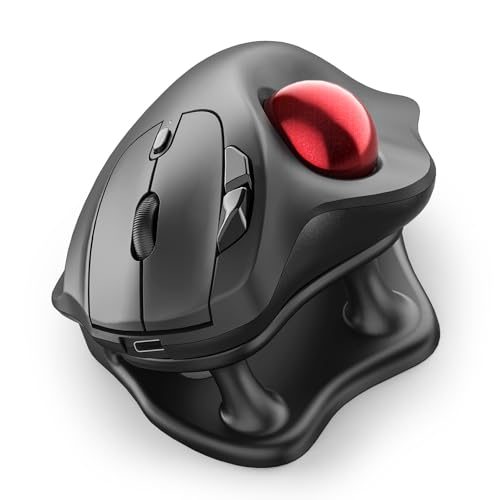


At a Glance
Modern MacBooks have only USB-C ports, so a trackball with a USB-A dongle needs an adapter or a hub to work. Bluetooth is the cleaner route, and every wireless model here lists it, so the Mac pairs the ball without a receiver at all.
Compatibility on a Mac is also more than a checkbox. Some listings name macOS versions that stop at 10.15 or 12, and others warn that forward and back buttons do not map on macOS. We compared the seven picks on listed support text, connection type, tilt, battery and price. Anything that does not explicitly name Mac in its listing was left out, and you should confirm your exact macOS version on the product page.
5 Criteria to Look For Before Buying a Trackball Mice for Mac
Key buying criteria so you get the right fit the first time.
Named macOS support
A listing that names macOS or Mac tells you the maker tested it. The Logitech M575S lists PC and Mac, and the SANWA wired model names macOS 10.12 to 12. Look for the name and version in the compatibility bullets, and be wary of listings that only say works on all systems. The Ergo M575S lists PC and Mac, and the SANWA wired names macOS 10.12 to 12. Read the first few reviews for any Mac complaints.
Side button drivers
Back and forward buttons usually need a driver, and some budget brands ship Windows only software. On a Mac, they may do nothing. Check the final bullets and the Q and A for macOS notes, since the pointer can work while shortcuts do not. The ProtoArc EM02's back and forward fail on macOS per its own listing. Confirm that each shortcut works before the return window ends.
USB-C only ports
Many MacBooks have only USB-C ports, so a USB-A receiver needs an adapter. Bluetooth avoids that. Look for Bluetooth in the title, and check the listing's connection details, since some picks are receiver-only. The SANWA 2.4G is receiver only; the M575S and Nulea M501 offer Bluetooth. An adapter costs a few dollars if you need one.
Tilt and wrist angle
A tilt such as 19 or 21.7 degrees reduces forearm twist on a long day, while flat models keep the palm down. Look for a stated angle, and think about how much change you want from your current mouse. The Nulea stand tilts 21.7 degrees and the SANWA 2.4G 19 degrees. Pick the tilt your wrist already likes.
Newer macOS versions
A listing that names an old macOS version may not guarantee support for the latest one. Basic functions usually work through standard drivers, but extras may fail. Check the date of the last reviews, and choose a Bluetooth model if unsure. The SANWA wired model confirms macOS 12 at most, so newer systems are untested. Skip any pick whose reviewers report dead buttons.
7 Best Trackball Mice for Mac in 2026
Logitech Ergo M575S Wireless Trackball (Off-White)
About this pick
The M575S title says PC and Mac compatible, with Bluetooth and an included Logi Bolt USB receiver. It is a thumb-ball with three customizable buttons and quiet clicks, in an off-white finish with a silver ball.
Next to the Nulea Wireless Trackball with 21.7 Degree Tilt Stand, it has no tilt and uses a replaceable AA battery rather than a built-in one. Compared with the SANWA Wired Ergonomic Trackball Mouse (34mm), it pairs wirelessly over Bluetooth, which suits USB-C-only MacBooks.
A solid default for a Mac desk. The caveat is that the receiver is USB-A, so pair over Bluetooth if your Mac has no spare USB-A port.
Best for: MacBook users wanting a trusted brand
Check price on AmazonPros
- +Bluetooth skips the USB-A dongle
- +Mac named in the title
- +Quiet clicks
- +Battery included in box
Cons
- −Receiver is USB-A only
- −No tilt adjustment
Nulea Wireless Trackball with 21.7 Degree Tilt Stand
About this pick
The Nulea lists compatibility with PC, Mac, laptops, tablets and phones, and uses a 21.7 degree tilt stand with a rechargeable battery. It pairs with three devices over Bluetooth or a USB receiver and lists silent operation.
Compared with the Logitech Ergo M575S Wireless Trackball (Off-White), it adds a steep tilt and recharging. Against the TECKNET Wireless Trackball Mouse, 16 Degree Angle, it costs a little more for a steeper tilt and fully silent controls.
Best for a Mac user who wants to switch among a MacBook, an iPad and a phone. The caveat is that tablets and phones are listed, but exact iPadOS support is not spelled out.
Best for: Tilted comfort and USB-C charging
Check price on AmazonPros
- +Mac named in the listing
- +Steep tilt for forearm posture
- +Silent clicks and wheel
- +Three device pairing
Cons
- −No battery life number
- −Tilt stand adds height
ProtoArc EM02 Wireless Trackball Mouse
About this pick
ProtoArc's EM02 offers a 0 or 15 degree tilt, a USB-C rechargeable battery with a listed 90 day standby time, and quiet-touch buttons. The listing notes broad compatibility, with a warning that the forward and back buttons do not work with macOS.
That Mac caveat is a real difference from the Logitech Ergo M575S Wireless Trackball (Off-White), whose listing carries no such warning. It is also a dollar cheaper than the Nulea Wireless Trackball with 21.7 Degree Tilt Stand.
A good pick if you do not rely on the side buttons. The caveat is the Mac button limitation stated in the listing.
Best for: Multi-device Mac and PC desks
Check price on AmazonPros
- +Long standby battery
- +USB-C charging
- +Tilt hinge
- +Quiet buttons
Cons
- −Back and forward fail on macOS
- −Fewer Mac details than rivals
SANWA Wired Ergonomic Trackball Mouse (34mm)
About this pick
SANWA's wired trackball has a 34mm thumb ball, silent buttons, four DPI levels from 600 to 1600 and software for button mapping. The listing names Windows 11 to 8, macOS 12, 11 and 10.12 to 10.15, and Chrome OS.
It is a wired alternative to the Logitech Ergo M575S Wireless Trackball (Off-White), and compared with the wireless SANWA 2.4G Wireless Trackball Mouse (40mm, 19 Degree) it has no tilt and no pairing. Note the Mac versions listed stop at 12, so newer releases are not confirmed.
Pick it for a docked Mac that already has a USB hub. The caveat is the older macOS list and the USB-A plug, which needs an adapter on a new MacBook.
Best for: A wired setup with a USB-C hub
Check price on AmazonPros
- +Mac versions explicitly listed
- +No batteries or pairing
- +Silent click buttons
- +Programmable buttons
Cons
- −Newer macOS not confirmed
- −USB-A plug needs an adapter
TECKNET Wireless Trackball Mouse, 16 Degree Angle
About this pick
The TECKNET title lists PC, Mac and laptop compatibility. It has a 16 degree vertical angle, a 500mAh rechargeable battery that charges quickly for a full day of use, and Bluetooth and 2.4GHz triple-device switching.
Compared with the Nulea Wireless Trackball with 21.7 Degree Tilt Stand, it is a little cheaper with a gentler tilt. Against the SANWA 2.4G Wireless Trackball Mouse (40mm, 19 Degree), it uses a built-in battery rather than a receiver-only link.
Good for a Mac user who forgets to charge. The caveat is that the 16 degree tilt is milder than the Nulea stand.
Best for: Quick top-ups and light tilt
Check price on AmazonPros
- +Mac named in the title
- +Fast charge for a full day
- +Mild tilt
- +Three device switching
Cons
- −Lower tilt than some rivals
- −Brand less known
SANWA 2.4G Wireless Trackball Mouse (40mm, 19 Degree)
About this pick
This SANWA has a 40mm ball, a 19 degree tilt, silent clicks, four DPI levels at 600 to 1600 and a design for right-handed use. The listing names Windows, Mac and Chrome OS with a USB receiver.
It has a bigger ball than the SANWA Wired Ergonomic Trackball Mouse (34mm), and compared with the TECKNET Wireless Trackball Mouse, 16 Degree Angle it uses a receiver rather than Bluetooth. That means you need a USB-A port or adapter on a MacBook.
Best for a Mac mini or an iMac with open ports. The caveat is the receiver dependency.
Best for: Mac users who like a tall tilt
Check price on AmazonPros
- +Larger 40mm ball
- +Tilt body
- +Silent buttons
- +Mac named in the listing
Cons
- −Receiver only, no Bluetooth
- −Right-hand design
Nulea M501 Wireless Trackball Mouse
About this pick
The Nulea M501 title lists PC, Mac and Windows compatibility. It has a thumb ball, a rechargeable battery, four DPI levels and six buttons, and connects to three devices by Bluetooth or a USB dongle.
It is the cheapest pick here, and compared with the Nulea Wireless Trackball with 21.7 Degree Tilt Stand you lose the tilt stand. Against the Logitech Ergo M575S Wireless Trackball (Off-White), it is far cheaper but has less brand backing.
A good budget starter for a MacBook over Bluetooth. The caveat is that button mapping on macOS may need testing.
Best for: Low-cost Bluetooth Mac setup
Check price on AmazonPros
- +Lowest price among Mac picks
- +Bluetooth pairing
- +Six buttons
- +Rechargeable
Cons
- −No tilt
- −Battery life not stated
How We Evaluated These Trackball Mice for Mac
Each pick was assessed across 5 criteria weighted for real-world use.
Named macOS support
We looked for explicit Mac statements, such as the Logitech Ergo M575S listing PC and Mac, and the SANWA wired model naming macOS 10.12 to 12. A listing that names macOS earns trust, while a vague works with all systems line does not. The Ergo M575S names PC and Mac; the Nulea M501 lists neither version.
Button behavior on Mac
We recorded known button caveats, such as the ProtoArc EM02 back and forward failing on macOS. A pointer that works while shortcuts fail is a daily annoyance, so a disclosed limitation cost a pick points even if it was honest. The ProtoArc EM02 warns its back and forward fail on macOS, while the Nulea 21.7 stand lists Mac.
Ports and pairing
We checked Bluetooth against USB-A receivers, since a recent MacBook may offer only USB-C. The M575S includes a Logi Bolt USB-A receiver but also Bluetooth, while the SANWA 2.4G is receiver-only. Port-free pairing weighed heavily. The M575S offers Bluetooth or Logi Bolt, but the SANWA 2.4G has only a USB receiver.
Tilt and comfort
We compared tilts, from the 21.7 degree Nulea stand to the 19 degree SANWA and flat Nulea M501. Comfort matters on a Mac desk where people work long hours, so a tilt option scored above a fixed flat shell. The Nulea stand tilts 21.7 degrees, the SANWA 19, and the M501 is flat.
Newer macOS uncertainty
We noted that the SANWA wired model names macOS only up to version 12. Newer macOS versions may behave differently, so an unconfirmed version cost a pick points, while one with Bluetooth and generic HID behavior was safer. The wired SANWA names macOS 10.12 to 12 only, so newer releases are unconfirmed.
How to Choose the Right Trackball Mice for Mac
By Mac Connection
| Your situation | Recommended pick |
|---|---|
| Your MacBook has USB-C ports only | Logitech Ergo M575S Wireless Trackball (Off-White) |
| You use a hub and prefer wired | SANWA Wired Ergonomic Trackball Mouse (34mm) |
| You switch among Mac, iPad and phone | Nulea Wireless Trackball with 21.7 Degree Tilt Stand |
| You have a Mac mini with spare USB-A | SANWA 2.4G Wireless Trackball Mouse (40mm, 19 Degree) |
By Budget
| Budget | Recommended pick |
|---|---|
| Under $30 | Nulea M501 Wireless Trackball Mouse |
| $30 to $34 | TECKNET Wireless Trackball Mouse, 16 Degree Angle |
| $35 to $37 | ProtoArc EM02 Wireless Trackball Mouse |
| Around $40 | Logitech Ergo M575S Wireless Trackball (Off-White) |
Bluetooth vs Receiver
Bluetooth
Pairs directly with the Mac and frees a port. The Logitech Ergo M575S Wireless Trackball (Off-White), Nulea Wireless Trackball with 21.7 Degree Tilt Stand, ProtoArc EM02 Wireless Trackball Mouse, TECKNET Wireless Trackball Mouse, 16 Degree Angle and Nulea M501 Wireless Trackball Mouse support it.
Receiver only
A dongle gives a quick link but needs USB-A. The SANWA 2.4G Wireless Trackball Mouse (40mm, 19 Degree) uses a receiver and the SANWA Wired Ergonomic Trackball Mouse (34mm) uses a cable.
Most MacBook owners should choose Bluetooth.
Side Button Needs
| Your situation | Recommended pick |
|---|---|
| You use back and forward constantly | Logitech Ergo M575S Wireless Trackball (Off-White) |
| You do not rely on side buttons | ProtoArc EM02 Wireless Trackball Mouse |
| You want six buttons | Nulea M501 Wireless Trackball Mouse |
| You want programmable buttons by software | SANWA Wired Ergonomic Trackball Mouse (34mm) |
For MacBook Desks Specifically
Look for
Bluetooth pairing, a stated Mac compatibility line and a rechargeable or AA power source.
In this comparison
The TECKNET Wireless Trackball Mouse, 16 Degree Angle lists Mac in its title with quick charging, and the Logitech Ergo M575S Wireless Trackball (Off-White) lists PC and Mac with an included battery.
When to Spend More
Spend more if
You want the most trusted brand with Bluetooth, as on the Logitech Ergo M575S Wireless Trackball (Off-White).
Save if
You just need basic Mac support, where the Nulea M501 Wireless Trackball Mouse covers it.
Frequently Asked Questions
Do trackballs work with macOS?
Basic pointing and clicking work with most trackballs through standard drivers. Extra buttons may need a driver. The Logitech M575S names Mac support, while the ProtoArc EM02 warns of failing back and forward buttons. Check each listing before buying.
Is the Logitech M575S the safest Mac pick?
Probably. It lists Bluetooth or a Logi Bolt receiver and names PC and Mac compatibility, which is clearer than most rivals. The tradeoff is no tilt adjustment and a USB-A receiver, so use Bluetooth on a USB-C-only MacBook.
Why do back and forward fail on some trackballs?
Those buttons rely on drivers that some brands ship only for Windows. The ProtoArc EM02 listing warns about it. Look for macOS in the title or compatibility bullets, and read reviews from Mac owners before buying.
Is the SANWA wired model safe for a new Mac?
It names macOS 10.12 to 12, so newer versions are unconfirmed. Basic pointing will probably still work, but extra functions may not. The USB-A plug also needs an adapter for MacBook ports.
How do I pair Bluetooth on a Mac?
Open System Settings, choose Bluetooth, and hold the trackball's pairing button until its light flashes. Select it in the list. For multi-device models like the Nulea M501, press the channel button first so each device keeps its own slot.
Can I customize buttons on a Mac?
Sometimes. Logitech's software runs on macOS, but many budget trackballs have no Mac software. Check the listing for supported operating systems before relying on custom buttons.
Bottom Line
best overall: Logitech Ergo M575S Wireless Trackball (Off-White) - best overall for mac pick in this roundup.
See the full rankings above for all picks with pros, cons, and best-for summaries.
Browse on Amazon
All Prime-eligible options with current pricing.
Shop on Amazon →