
6 Best Small Keyboards for Mac in 2026
Six compact keyboards with Mac-friendly layouts for MacBook, iMac and Mac mini desks, from Apple's own to wireless, wired and mechanical alternatives.

New to Amazon Prime?
Get fast, free shipping on every pick in this guide, plus Prime Video and exclusive deals.
Try Prime Free


At a Glance
A Mac keyboard is not just a PC keyboard with a different logo. Command and Option sit in different places from Windows and Alt, the top row carries Mission Control, Spotlight and dictation keys, and a Windows-first board can leave you remapping modifiers in System Settings before you type a sentence. For a compact Mac desk, those details matter more than the brand.
We selected six small boards that treat macOS as a first-class system, from Apple's own Magic Keyboard to a mechanical option and affordable wireless and wired boards. Each is compared on Mac key mapping, connection type and how much room it leaves for a mouse.
5 Criteria to Look For Before Buying a Small Keyboards for Mac
Key buying criteria so you get the right fit the first time.
Mac modifier layout
Mac keyboards put Control, Option and Command in a specific order, and the Windows order differs. Wrong order makes shortcuts feel off until you remap. Look for 'Mac layout' or printed Command and Option, and check that Windows boards include a toggle. On a Mac, Command sits beside the spacebar, and Windows boards that put Alt there make shortcuts like copy and paste awkward until remapped.
Function row and shortcut keys
Mac function keys control brightness, Mission Control, Spotlight and dictation. A Windows-first board may not map these properly. Check the listing for shortcut keys such as 13 Mac shortcuts or for the number of dedicated keys. A board with dedicated brightness and media keys, such as the Macally pair's 13 shortcuts, avoids opening settings for common tasks.
Bluetooth pairing and multi-device
Mac keyboards generally pair over Bluetooth, and boards with several channels let you switch between a Mac, an iPad and a phone. Check the number of devices and whether the listing mentions auto-detection of the operating system. If you also use an iPad or phone, a 3-slot board such as ProtoArc K90-A saves re-pairing each time you switch.
Battery and charging port
USB-C charging matches current Macs and removes a separate cable. Rated life ranges from a month to six months depending on lighting and use. Look for the battery capacity and USB-C, not micro-USB. A battery quoted in months, like Macally's 800mAh up to 2 months, beats one that lists only a capacity with no runtime.
Mechanical versus scissor feel
Scissor keys are shallow and match the MacBook's feel, while low-profile mechanical keys give more feedback. If you use a Mac laptop all day, shallow keys feel familiar, but heavy typists often prefer a mechanical board. Check for the switch type in the title or bullets. Scissor keys feel shallow and quiet, while a low-profile mechanical like Logitech's gives a tactile bump, so try the feel if you can before committing.
6 Best Small Keyboards for Mac in 2026
Apple Magic Keyboard
About this pick
The Apple Magic Keyboard is wireless and rechargeable, with an internal battery that the listing says lasts about a month or more between charges. It pairs automatically with a Mac and has a USB-C port and a woven USB-C cable for pairing and charging.
It has no number pad, so it is already compact, though it is plain compared with mechanical options. Against the Macally boards it costs more but needs no mapping and no learning curve on a Mac.
Choose it if you want the system to work exactly as intended with no extra settings. If you want mechanical switches or backlight options, look at the Nuphy or Logitech picks.
Best for: people who want a keyboard that just works with their Mac
Check price on AmazonPros
- +Native Mac key layout
- +Auto-pairs with a Mac
- +Month-long battery rating
- +USB-C charge cable included
Cons
- −Costs more than basic boards
- −No backlight on the listing
NuPhy Air75 V2
About this pick
The NuPhy Air75 V2 is a 75% low-profile mechanical keyboard with an aluminum frame, Bluetooth 5.1, 2.4GHz and USB-C connections, more than 21 RGB effects and QMK/VIA support. It works with Mac, Windows, Linux, Android and iOS.
It is the one pick here that gives you a mechanical typing feel on a slim board. Against the Logitech MX Mechanical Mini for Mac it costs much less and is more customizable, though less polished on software.
Pick it for a Mac that sees heavy typing and a desk that is short on space. The tradeoff is that key layout is Windows-first, so check the mode switch for macOS.
Best for: heavy typists who want mechanical keys on a Mac
Check price on AmazonPros
- +Mechanical feel in a slim body
- +Three connection modes
- +QMK/VIA remapping
- +Works across Mac, Windows and Linux
Cons
- −Legends may be Windows-first
- −RGB drains battery
ProtoArc K90-A
About this pick
The ProtoArc K90-A is a compact Bluetooth keyboard made only for Mac and iPad, with backlit Mac keys, a metallic plate, three Bluetooth channels and three soft white backlight levels. The listing warns that it is Mac only and does not work with Windows.
That narrow focus is the point: the key legends and shortcuts match macOS, and the board is cheaper than Apple's. Compared with the Macally wireless board it offers backlighting.
Choose it if you use only Macs and iPads and type in dim light. Do not buy it if you ever share it with a PC.
Best for: Mac and iPad users who type in low light
Check price on AmazonPros
- +Mac-specific key legends
- +Backlit keys
- +Three device slots
- +Metal plate
Cons
- −Mac and iPad only
- −Bluetooth only
Macally Wireless Bluetooth Keyboard for Mac
About this pick
The Macally wireless keyboard for Mac has 78 keys and 13 shortcut keys, uses Bluetooth with auto OS detection, and has an 800mAh rechargeable battery that the listing rates for up to two months. It works with Mac, PC, iOS and iPad and carries a warranty of up to two years.
It is the only pick with auto OS detection and a long warranty. Against the ProtoArc K90-A it is not backlit but works with Windows, and against the Apple Magic Keyboard it costs less.
Pick it as a flexible compact board for a Mac with a PC sometimes in the mix. If you want backlit keys, step to the ProtoArc.
Best for: a Mac desk that sometimes connects to a PC
Check price on AmazonPros
- +Auto-detects the operating system
- +Up to two-year warranty
- +Rechargeable battery
- +Works with Mac, PC and iPad
Cons
- −No backlight
- −Layout not as tight as mini boards
Macally Small USB Wired Keyboard
About this pick
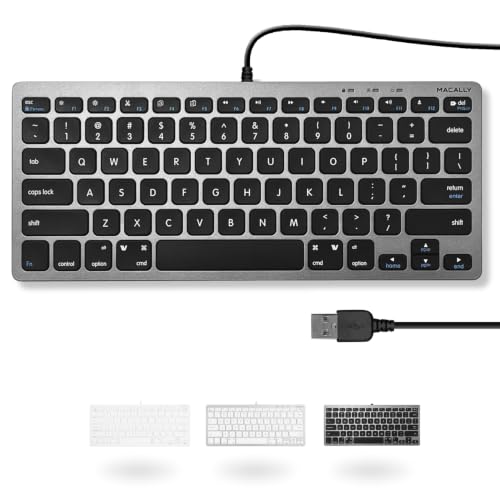
The Macally Small USB Wired Keyboard has 78 scissor-switch keys and 13 shortcut keys for cut, copy, paste and iTunes on a Mac, and multimedia hotkeys on Windows. It uses a 4 foot 7 inch cable and is plug and play.
It is the simplest option: no battery, no pairing, and no software. Against the wireless Macally it costs less to own over time but is tethered.
It suits a fixed Mac desk where reliability matters. If you want to move the keyboard, pick a wireless one.
Best for: a fixed Mac desk where reliability matters
Check price on AmazonPros
- +Plug and play
- +No battery to charge
- +Shortcut keys for Mac
- +Compact 78-key layout
Cons
- −Wired only
- −Plain design
Logitech MX Mechanical Mini for Mac
About this pick
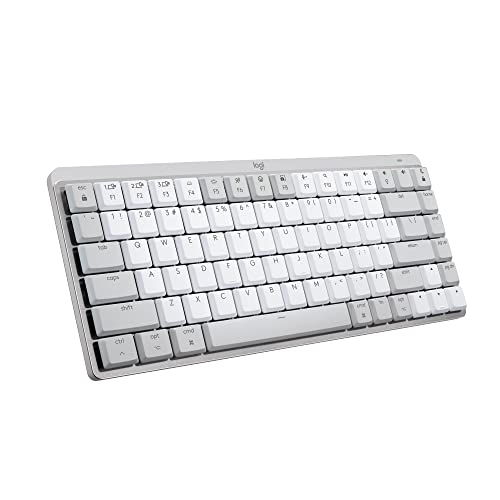
The MX Mechanical Mini for Mac is a low-profile wireless keyboard with a Mac key layout, Tactile Quiet switches and smart backlighting that lights keys as hands approach. It is described as compact with a minimalist form and can connect to multiple devices through Logi Options+.
It is the most expensive pick and the quietest of the mechanical options. Compared with the NuPhy Air75 V2, it gives up customization for polish and Mac-native keys.
Choose it if you want a premium mechanical feel in a Mac-first design. If budget is tight, the NuPhy is cheaper.
Best for: a premium quiet mechanical board for a Mac
Check price on AmazonPros
- +Mac-native key layout
- +Quiet tactile switches
- +Backlight adapts to hands
- +Low-profile body
Cons
- −Costs the most of this group
- −Limited switch choices
How We Evaluated These Small Keyboards for Mac
Each pick was assessed across 5 criteria weighted for real-world use.
Mac key layout and legends
A Mac keyboard needs Command and Option in the right order and Mac-labelled function keys. Apple Magic Keyboard, ProtoArc K90-A and Logitech MX Mechanical Mini for Mac are Mac-native, while NuPhy Air75 V2 may ship Windows-first legends, so we checked how each listing handles that.
Function row and shortcut keys
Macally's two boards list 13 shortcut keys for brightness, volume and media, and ProtoArc keeps Mac legends on a compact layout. We checked whether F1 through F12 map to Mac controls out of the box, since a Windows-first board needs a remap before brightness works.
Bluetooth pairing and device switching
ProtoArc lists 3 Bluetooth channels, NuPhy adds 2.4GHz and Bluetooth 5.1, and Logitech works across several devices. We favored boards that switch between a Mac and an iPad in one keypress, over single-device pairing that needs repeating.
Battery and charging port
Apple and Macally Bluetooth charge over USB-C or a rechargeable cell, and Macally lists an 800mAh battery for up to 2 months. We counted USB-C as a plus for a Mac that already uses that cable, and noted that NuPhy's RGB drains battery faster.
Typing feel at this size
Apple and Macally use scissor switches with short travel, while NuPhy Air75 V2 and Logitech MX Mechanical Mini are low-profile mechanical boards. We compared them on feel and noise, since a shallow scissor key and a tactile low-profile switch suit different typists.
How to Choose the Right Small Keyboards for Mac
By Typing Feel
Mac typists split between shallow scissor keys and a mechanical bump.
| Preference | Recommended pick |
|---|---|
| Shallow, quiet, native Mac layout | Apple Magic Keyboard, with auto-pairing and USB-C. |
| Mechanical feel, quiet switches, Mac keys | Logitech MX Mechanical Mini for Mac, with Tactile Quiet switches. |
| Mechanical feel with remapping | NuPhy Air75 V2, a 75% aluminum low-profile board with QMK/VIA. |
| Backlit scissor-style, Mac legends | ProtoArc K90-A, with a 3-level white backlight. |
| Plain scissor keys | Macally Wireless Bluetooth Keyboard for Mac, 78 keys. |
By Budget
Spend by what you need to keep, not by brand.
| Price range | Recommended pick |
|---|---|
| $25 to $50, simple compact | ProtoArc K90-A, Macally Bluetooth or Macally USB Wired. |
| $50 to $75, mechanical | NuPhy Air75 V2, the only low-profile mechanical in this band. |
| $75 to $100, native Apple | Apple Magic Keyboard. |
| $100 to $150, quiet mechanical | Logitech MX Mechanical Mini for Mac. |
Wired vs Bluetooth
Reliability against desk neatness.
Wired
No battery, no pairing, and no lag. Macally Small USB Wired is plug and play with a 4 ft 7 in cable, but the cord ties it to the Mac or a dongle.
Bluetooth
A clean desk and easy device switching. Apple, ProtoArc, Macally Bluetooth and NuPhy all use it, but they need charging.
Choose wired Macally for a fixed desk and Bluetooth such as ProtoArc K90-A for a Mac plus iPad.
By Connection Need
Match the board to the devices you switch between.
| Need | Recommended pick |
|---|---|
| One Mac only | Apple Magic Keyboard. |
| Mac plus iPad and phone | ProtoArc K90-A, with 3 Bluetooth channels. |
| Mac, PC and tablet | Logitech MX Mechanical Mini for Mac, multi-device. |
| Lowest latency | NuPhy Air75 V2 on 2.4GHz. |
For Small Desks and Laptops Specifically
Look for
No number pad, a thin body that fits a laptop bag and a layout that keeps arrow keys.
In this comparison
Apple Magic Keyboard and ProtoArc K90-A skip the numpad, and NuPhy Air75 V2 is a 75% board that keeps a function row.
When to Spend More
Spend more if
You type for hours. Logitech MX Mechanical Mini for Mac and NuPhy Air75 V2 sit above the $50 band for their switches.
Save if
You only need basic typing. ProtoArc K90-A, Macally Wired and Bluetooth stay $25 to $50.
Frequently Asked Questions
Will a Windows keyboard work on a Mac?
It will connect, but the keys may be in the wrong places. Windows boards put Alt and Windows where a Mac expects Option and Command, and brightness keys may not work. Boards such as ProtoArc K90-A and Logitech MX Mechanical Mini for Mac print Mac legends.
Does the Apple Magic Keyboard work with an iPad?
It pairs over Bluetooth with iPads as well as Macs, but it is a single-device board that you re-pair when switching. If you move between a Mac and an iPad often, ProtoArc K90-A with 3 Bluetooth channels is easier to switch.
Is NuPhy Air75 V2 worth choosing over Apple Magic Keyboard?
For typing feel and customization, yes. NuPhy is a 75% low-profile mechanical board with QMK/VIA remapping and three connection modes, but its legends can be Windows-first. Apple wins on native layout and automatic pairing, so choose by what you value.
Is a wired Macally keyboard better than a Bluetooth one?
For simplicity, yes. Macally Small USB Wired has a 4 ft 7 in cable, 78 scissor keys and no battery to charge, so it works instantly. The Bluetooth Macally adds auto OS detection and 2 months of battery but needs pairing.
How do I remap keys on a Mac with a non-Mac keyboard?
Use System Settings under Keyboard, then Modifier Keys, to swap Option and Command. For NuPhy Air75 V2 or Logitech, QMK/VIA or Logi software can do the same on the board. Remapping fixes position, but not mismatched printed legends.
Will a small Mac keyboard drain my laptop battery over Bluetooth?
Barely. Bluetooth keyboards draw a tiny amount, and Apple Magic Keyboard is rated for about a month on a charge. The bigger drain is NuPhy's RGB backlight, so turn the lighting down if you want its battery to last.
Bottom Line
best overall: Apple Magic Keyboard - best native mac fit pick in this roundup.
See the full rankings above for all picks with pros, cons, and best-for summaries.
Browse on Amazon
All Prime-eligible options with current pricing.
Shop on Amazon →