
5 Best Ergonomic Mice Under $50 in 2026
Five ergonomic mice under $50 compared by vertical angle, multi-device Bluetooth, battery claims and hand size, plus a side-scroll and a travel pick.

New to Amazon Prime?
Get fast, free shipping on every pick in this guide, plus Prime Video and exclusive deals.
Try Prime Free


At a Glance
TECKNET Vertical Wireless Mouse for Medium to Large Hands
↓ See why we picked itFifty dollars is enough to skip the barebones tier: rechargeable batteries, three-device Bluetooth and a choice of hand sizes all show up here. Spending closer to the ceiling does not automatically buy a more comfortable mouse, though, since the shape you pick matters more than the brand on it.
This list mixes two TECKNET vertical mice, a TECKNET model with a side scroll wheel, a rotating arc travel mouse and the Dell MS700. Prices run from under $25 to $49. We read every listing for grip angle, stated hand size, scroll features, battery claims and how each is meant to be carried or used, so you can match a shape to your workday rather than chase the highest price.
6 Criteria to Look For Before Buying a Ergonomic Mice Under $50
Key buying criteria so you get the right fit the first time.
Angle stated in degrees
A vertical mouse's tilt, often listed as 57 degrees, controls how far your forearm rotates away from the twisted palm-down posture. A listing with no number may be only a mild contour. Look for the degree figure in the title or bullets, and expect a week of awkward pointing as your wrist adjusts to the new position. The TECKNET 57 degree listing gives an angle; the NYIEFADA arc does not.
Hand size and shell dimensions
Medium to large hands need a longer shell, and a shell that is too short makes your fingers curl and tire. The TECKNET medium to large model names its range, while others give no guidance. Measure your hand from the wrist crease to the tip of the middle finger and compare it with the listed dimensions. The TECKNET medium to large model is the only pick here that names a hand size.
Three-device pairing
Multi-device mice remember two Bluetooth hosts plus a 2.4G dongle and switch with a button. That saves you from re-pairing each time you move between a laptop and desktop. Verify the listing says 3 devices, and check that the receiver is included in the box, because a missing dongle leaves a 2.4G channel unusable. Dell MS700 and TECKNET list three devices; the NYIEFADA lists Bluetooth 5.0/4.0 plus 2.4G.
Rechargeable battery claims
Charging claims such as a 200 hour figure describe the maker's best case, usually with low brightness and no heavy use. A 500mAh cell is typical at this tier. Look for a Type-C port, which is easier to replace cables for, and for a note on whether the mouse works while charging. The TECKNET 57 degree claims 200 hours from a 500mAh cell, which is a best case.
Side buttons and scroll hardware
Extra buttons and a horizontal wheel only help if the driver maps them on your system. On macOS, many side functions need Windows software. Read the Q and A section for your operating system, and look for metal wheels, which tend to last longer than plastic ones. The TECKNET side scroll model lists no battery figure, so ask before assuming.
Right-hand only designs
Most vertical shells are molded for the right hand and cannot be flipped. If you use your left, a right-handed shell will not be comfortable. Look for the phrase ambidextrous or left-handed in the title or the compatibility bullets, and check the return policy before opening the box. All five listed here are right-handed or unstated, so left-handers should check first.
5 Best Ergonomic Mice Under $50 in 2026
TECKNET 57-Degree Silent Vertical Mouse, Rechargeable
About this pick
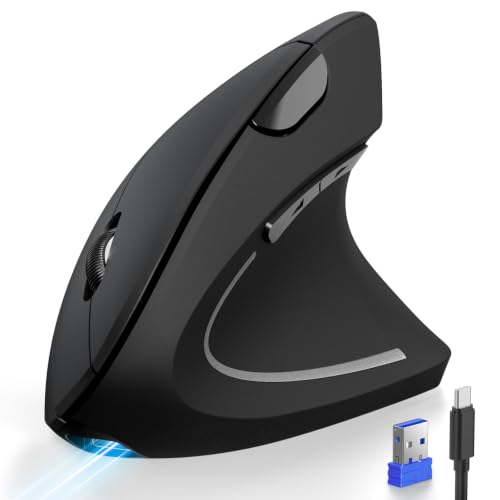
TECKNET lists a 57 degree vertical shape meant to keep the hand and forearm in a handshake position, ultra-quiet buttons and 5 DPI levels. It pairs three devices over Bluetooth and 2.4G and has a 500mAh built-in battery, which the listing claims lasts 200 hours.
It costs the same as the side-scroll TECKNET further down but swaps the horizontal wheel for a steeper vertical angle. Compared with the larger-hand TECKNET just below, it is not tied to a specific hand size in the listing.
Best for a typical hand that wants vertical posture and quiet clicks in one mouse. The caveat is that the steep angle takes a few days to adjust to, and the listing gives no hand size guidance.
Best for: Quiet vertical mouse for typical hands
Check price on AmazonPros
- +Steep vertical shape for forearm rotation
- +Silent click mechanisms
- +Switches among 3 devices
- +Long listed battery life
Cons
- −No hand size guidance
- −Takes days to settle in
TECKNET Vertical Wireless Mouse for Medium to Large Hands
About this pick
This TECKNET vertical mouse is described as built for medium to large right hands. It has three connection modes, BT 5.0, BT 3.0 and 2.4GHz, six DPI levels from 800 to 4800, forward and back buttons and a Type-C charging cable.
It is the lowest-priced pick here, and the only one that clearly says it fits bigger hands, which the 57 degree TECKNET above does not. The listing does not claim silent clicks.
Choose it if most vertical mice feel cramped in your hand. The caveat is that it is right-handed only and carries no quiet-click claim.
Best for: Larger right hands
Check price on AmazonPros
- +Sized for medium to large hands
- +Three connection modes
- +Lowest price of the five
- +Forward and back buttons
Cons
- −Right-handed only
- −No quiet-click claim
TECKNET Side Scroll Bluetooth Mouse, 3-Device
About this pick
This TECKNET pairs a side-mounted horizontal scroll wheel with a metal main wheel, six DPI levels from 800 to 4800, quiet clicks and a rechargeable battery. It supports two Bluetooth links plus a 2.4GHz receiver.
Unlike the two vertical TECKNET picks, it uses a conventional shape, so comfort comes from the contour and the thumb wheel rather than from rotating the forearm. It suits wide spreadsheets and timelines more than posture.
Best for spreadsheet and editing work. The caveat is that the hand stays flatter, and the listing gives no battery life figure.
Best for: Wide spreadsheets and timelines
Check price on AmazonPros
- +Dedicated horizontal scroll wheel
- +Quiet click design
- +Rechargeable battery
- +Pairs 3 devices
Cons
- −Flat shape, no vertical angle
- −No battery life figure
NYIEFADA Rotating Foldable Arc Travel Mouse
About this pick
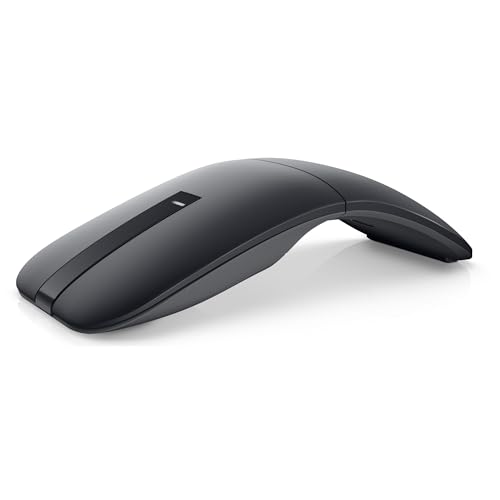
NYIEFADA is an arc-shaped Bluetooth travel mouse that rotates and snaps flat to fit a pocket. It offers silent soft clicks, Bluetooth 5.0/4.0 plus 2.4G, support for 3 devices and a built-in rechargeable battery. The listing notes the shell is ABS plastic, not aluminum.
Compared with the vertical TECKNET picks it favors portability over palm support, and it costs under $10 more than they do. Next to the Dell MS700 it is rechargeable rather than using AAA cells.
Best for commuters and hot-desk workers who carry the mouse every day. The caveat is that a slim arc offers less hand support for a full day at one desk.
Best for: Commuters and hot-desking
Check price on AmazonPros
- +Folds flat for pockets
- +Silent soft clicks
- +Pairs with 3 devices
- +Rechargeable, no AAA cells
Cons
- −Less palm support
- −ABS plastic, not aluminum
Dell MS700 Bluetooth Travel Mouse
About this pick
Dell MS700 weighs just 56.9 grams and uses a twist-to-stow design, with 4000 DPI, touch scroll and connection to up to 3 devices over Bluetooth 5.0 LE. It runs on AAA batteries.
It is the most expensive pick here, close to $49, and the least ergonomic by shape. Compared with NYIEFADA it is lighter and brand-backed but not rechargeable.
Best for someone who wants a light branded travel mouse and values weight over posture. The caveat is the price for a basic shape.
Best for: Light branded travel mouse
Check price on AmazonPros
- +Very light at 56.9 g
- +Twist to switch off and stow
- +Touch scroll surface
- +3 device Bluetooth
Cons
- −Highest price here
- −Basic shape for the money
How We Evaluated These Ergonomic Mice Under $50
Each pick was assessed across 5 criteria weighted for real-world use.
Vertical angle in degrees
We looked for a stated tilt on each listing, such as the 57 degree TECKNET, because the angle decides how far the forearm rotates. Between $20 and $50 buyers can get a real vertical shell, so a pick that never states its angle lost ground to one that does.
Multi-device switching
We compared Bluetooth and 2.4G channels, since a $25 to $50 mouse should handle a laptop plus a desktop without re-pairing. Three-device models like the TECKNET side scroll scored well, while single-channel designs lost points for anyone juggling more than one machine.
Travel versus desk shape
We separated desk-size shells from travel mice such as the Dell MS700 and the NYIEFADA foldable arc, which weighs little and snaps flat. A pocket mouse trades palm support for portability, so we judged each pick against the job it was actually built for.
Scrolling and side controls
We checked scroll hardware, including the side wheel plus metal main wheel on the TECKNET Side Scroll, because spreadsheet and timeline work leans on horizontal scrolling. Extra wheels earned credit only when the listing described how the control works.
Value against the $50 ceiling
We weighed each shell against what the cheaper $25 tier already offers. The Dell MS700 sits near the ceiling, so it had to justify the premium with portability and brand support rather than just a basic shape, while the sub-$25 vertical picks set the bar.
How to Choose the Right Ergonomic Mice Under $50
By Hand Size and Grip
Match the shell to your hand and how you grip.
| Your situation | Recommended pick |
|---|---|
| Typical hand wanting vertical and quiet | TECKNET 57-Degree Silent Vertical Mouse, Rechargeable |
| Medium to large right hand | TECKNET Vertical Wireless Mouse for Medium to Large Hands |
| Flat hand position, lots of scrolling | TECKNET Side Scroll Bluetooth Mouse, 3-Device |
| Pocket-size grip on the go | NYIEFADA Rotating Foldable Arc Travel Mouse |
By Budget
Real prices from this comparison.
| Price range | Recommended pick |
|---|---|
| $22 to $25 | TECKNET Vertical Wireless Mouse for Medium to Large Hands |
| $25 to $32 | NYIEFADA Rotating Foldable Arc Travel Mouse |
| $45 to $49 | Dell MS700 Bluetooth Travel Mouse |
The vertical picks cost the same or less than the travel mice.
Vertical vs Travel Shape
Vertical
The hand stands on its edge and the forearm rotates toward a handshake. TECKNET 57-Degree and TECKNET Medium to Large Hands fall here.
Travel arc or twist
Slim and light so it fits in a bag, but with less palm support. NYIEFADA and Dell MS700 fall here.
Choose vertical for a desk mouse and a travel shape only if you carry it daily.
By Scroll Need
Scrolling matters differently for spreadsheets, documents and travel.
| Your situation | Recommended pick |
|---|---|
| Horizontal scrolling in spreadsheets | TECKNET Side Scroll Bluetooth Mouse, 3-Device |
| Touch scroll on the go | Dell MS700 Bluetooth Travel Mouse |
| Standard wheel with vertical posture | TECKNET 57-Degree Silent Vertical Mouse, Rechargeable |
| Standard wheel for a big hand | TECKNET Vertical Wireless Mouse for Medium to Large Hands |
For Hybrid Workers Specifically
Look for
A mouse that pairs with a laptop and a desktop, stays quiet in shared spaces and recharges without spare batteries.
In this comparison
TECKNET 57-Degree Silent Vertical Mouse, Rechargeable has 3-device pairing, silent buttons and a 200 hour battery claim.
When to Spend More
Spend more if
You carry the mouse every day and want it to fold or twist flat (NYIEFADA Rotating Foldable Arc Travel Mouse).
Save if
You mostly work at one desk, where TECKNET 57-Degree Silent Vertical Mouse, Rechargeable covers the ergonomic basics.
Frequently Asked Questions
Is a vertical mouse under $50 better than one under $25?
Not always. Shape and angle are similar, since both tiers offer 57 degree shells, but this tier adds more reliable multi-device pairing, Type-C charging and longer battery claims. Pay more only if you switch between machines or want a bigger shell, like the TECKNET for medium to large hands.
Can one mouse switch between a laptop and desktop?
Yes. The TECKNET 57 degree, TECKNET side scroll and Dell MS700 list three-device pairing, so you press a button to move between channels instead of re-pairing. Pair each computer once, label which channel is which, and the switch takes a single press afterward.
What does a side scroll wheel do?
A side wheel scrolls horizontally, which helps in spreadsheets, timelines and wide documents. The TECKNET Side Scroll pairs one with a metal main wheel. It uses your thumb, so check that your hand can reach it comfortably, since the reach depends on hand size and grip.
Is a travel mouse a good main mouse?
Rarely. The NYIEFADA arc and the Dell MS700 are made to fit a bag, so they give the palm less support than a full shell. They are fine for a coffee shop or a hotel desk, but anyone typing and clicking for hours should keep a full-size ergonomic mouse at the main desk.
Do vertical mice work with Mac laptops?
The pointer works over Bluetooth on macOS, but some side buttons depend on drivers that are Windows only. Check each listing for a macOS note before buying. The three-device Bluetooth models avoid the dongle problem entirely, which matters on a MacBook with only USB-C ports.
How do I clean and care for a vertical mouse?
Wipe the shell and thumb rest with a slightly damp cloth, and clear lint from the sensor window with a dry cotton swab. Never soak it. For rechargeable models, avoid leaving them at zero charge for weeks, and remove AAA cells if you will not use the mouse for a month.
Bottom Line
best overall: TECKNET 57-Degree Silent Vertical Mouse, Rechargeable - best overall pick in this roundup.
See the full rankings above for all picks with pros, cons, and best-for summaries.
Browse on Amazon
All Prime-eligible options with current pricing.
Shop on Amazon →